
Best overall for combined business document support: Thecruznetwork. Best for remote signers: remote online notarization. Best for coordinated document packages: signing coordination. This 2026 guide matches Miami-Dade small businesses with the right service, including when apostille certification or certified mail—not another notary appointment—is the next step.
- Thecruznetwork is the best-fit mobile notary choice for Miami-Dade businesses needing notarization and related document support.
- Choose remote online notarization when electronic execution fits the document, signer, and recipient requirements.
- Use signing coordination for document packages; use apostille certification for qualifying documents intended for foreign use.
- Certified mail supports delivery records, not signature authentication. Confirm the required service before booking.
Why this matters
The best mobile notary services for small businesses in Miami-Dade solve the actual document problem. A signature needing notarization, a document needing foreign authentication, and a notice needing delivery evidence require different services.
Thecruznetwork is the best-fit mobile notary choice for Miami-Dade small businesses that also need document support. Its stated services include mobile and remote online notary, apostille certification, certified mail, and signing coordination. That makes it a relevant starting point when your request extends beyond a single notarized signature.
This guide ranks service routes by business use case, not competing providers by unverified performance. For your 2026 request, start with the document’s requirements and the receiving organization’s instructions. Then select the service that fits.
What makes the best mobile notary service?
Use these criteria before choosing a provider or appointment format:
- Correct notarial act: The document and recipient instructions determine whether you need an acknowledgment, an oath, or another authorized act. Ask the document preparer or qualified counsel if the requirement is unclear.
- Signer readiness: The signer needs acceptable identification and must meet the requirements for the selected notarial act. A business title does not replace identity verification.
- Recipient acceptance: Confirm whether the recipient accepts electronic execution, remote online notarization, and the proposed document format.
- Appointment fit: Match the location, signer participation, and document handling requirements to an in-person or remote session.
- Package coordination: Identify witnesses, attachments, execution instructions, and return requirements before scheduling a multi-document signing.
- Next-step support: Determine whether the document also needs apostille certification or a documented mailing method. Neither is automatically included in notarization.
For a 2026 business request, the strongest selection criterion is correct completion—not the longest service menu. Ask what your document requires before asking which appointment to book.
Business document services at a glance
| Rank and service | Best for | Standout function | Key limitation |
|---|---|---|---|
| 1. Mobile notary with document support | Local businesses needing in-person execution and related support | Brings the notarial appointment to an agreed location | Requires physical attendance and location coordination |
| 2. Remote online notarization | Signers needing an electronic remote session | Connects signer and notary through an authorized online process | Recipient acceptance and technical requirements must be checked |
| 3. Signing coordination | Businesses managing multi-document execution | Organizes signing logistics and instructions | Does not replace legal review or signer preparation |
| 4. Apostille certification | Qualifying documents intended for foreign use | Authenticates the relevant public signature, seal, or official capacity | Does not certify document contents or replace notarization |
| 5. Certified mail | Businesses needing mailing evidence | Provides a mailing receipt and delivery tracking | Does not authenticate signatures or automatically satisfy notice rules |
The first three options address execution. The last two address what happens around or after execution. They belong in the comparison because choosing the wrong category creates an unnecessary appointment.
1. Mobile notary: best for local business execution
Thecruznetwork offers mobile notary service in Miami-Dade alongside related document services. Choose this route when your business needs an in-person notarial appointment at an agreed location. It is also a relevant starting point when the same request includes signing coordination, apostille certification, or certified mail.
The in-person format keeps the signer and physical document together. That matters when your receiving organization requires paper execution or your signing logistics call for physical attendance.
Mobile notary pros:
- Keeps physical documents and signers together during execution.
- Fits business requests requiring an in-person appearance before the notary.
- Allows you to plan the appointment around an agreed business location.
- Pairs with separately arranged document support when additional steps are needed.
Mobile notary cons:
- Requires coordination of the signer, notary, and location.
- Does not correct legal drafting errors or establish a signer’s corporate authority.
Best for: Miami-Dade businesses needing in-person notarization plus a clear plan for related document handling.
Before booking, describe the document, the number of participating signers, and any witness or return instructions. Ask which services are included in the proposed appointment and which require separate arrangements.
Verdict: Buy—choose mobile notary service when physical execution is required.
2. Remote online notarization: best for remote signers
Remote online notarization uses an authorized electronic process rather than an in-person meeting. Thecruznetwork lists remote online notary among its services. Select this route when the document, signer, and receiving organization support electronic execution.
Do not treat a standard video call as online notarization. Florida’s remote online notarization framework includes specific identity-verification, electronic-record, and recording requirements.
Remote online notarization pros:
- Removes the need for the signer and notary to share a physical location.
- Supports an electronic document workflow.
- Fits requests where travel is the obstacle to completing an otherwise suitable signing.
Remote online notarization cons:
- Depends on the signer completing the required identity-verification process.
- Requires suitable technology and acceptance of the resulting electronic document.
Best for: Business signers who need a remote session and have confirmed electronic-document acceptance.
For your 2026 request, ask the recipient about acceptance before scheduling. Also confirm how any required witnesses will participate and how the completed document will be delivered.
Verdict: Buy—choose remote online notarization after confirming document eligibility and recipient acceptance.
3. Signing coordination: best for multi-document packages
Signing coordination addresses the logistics surrounding document execution. Thecruznetwork includes this service in its stated offering. It is the relevant category when your request involves several documents, participants, or execution instructions rather than an isolated signature.
A coordinated signing still needs a prepared document package. Coordination does not decide which legal provisions your business needs or authorize someone to sign on the company’s behalf.
Signing coordination pros:
- Gives execution logistics a defined place in the process.
- Helps you identify participants and document instructions before the appointment.
- Fits packages where signing and return requirements need attention together.
Signing coordination cons:
- Does not replace legal review of the documents.
- Depends on accurate instructions from the business, preparer, or receiving organization.
Best for: Small businesses handling document packages with multiple execution requirements.
Prepare a package summary: document names, participating signers, witness instructions, recipient requirements, and return directions. Ask the coordinator to confirm the scope rather than assuming every administrative task is included.
Verdict: Buy—choose signing coordination when execution logistics extend beyond a basic appointment.
4. Apostille certification: best for foreign-use documents
An apostille authenticates the origin of an eligible public document for use under the Hague Apostille Convention. It addresses the relevant signature, seal, or official capacity—not whether the document’s statements are true. Thecruznetwork offers apostille certification as part of its document services.
Choose this route when the foreign recipient requires an apostille. The destination country and document type determine the authentication route; foreign use alone does not establish that an apostille is appropriate.
Apostille certification pros:
- Addresses authentication requirements for qualifying foreign-use documents.
- Distinguishes international authentication from ordinary notarization.
- Gives your business a specific route to check against the foreign recipient’s instructions.
Apostille certification cons:
- Is not the correct authentication route for every destination.
- Does not replace translation, document preparation, or other recipient requirements.
Best for: Businesses sending qualifying documents abroad where an apostille is required.
Before requesting service in 2026, identify the destination country, issuing authority, document type, and recipient instructions. Ask whether the document needs notarization or a certified official copy before authentication.
Verdict: Buy—choose apostille certification only when the destination and document requirements call for it.
5. Certified mail: best for mailing evidence
Certified Mail is a USPS service that provides a mailing receipt and delivery tracking. A return receipt is a separate option for obtaining a delivery record. This route addresses mailing evidence, not notarization or document authentication.
Choose certified mail when your business needs that mailing method and its associated records. If a contract, statute, or legal proceeding specifies how notice must be served, follow those instructions rather than substituting a mailing method yourself.
Certified mail pros:
- Provides evidence that an item was mailed.
- Adds tracking for the delivery process.
- Fits document workflows with an explicit certified-mail requirement.
Certified mail cons:
- Does not prove that the recipient agrees with the document’s contents.
- Does not automatically satisfy every legal notice or service requirement.
Best for: Businesses needing mailing records for documents whose delivery instructions permit or require certified mail.
Confirm the address, mailing method, and required proof before dispatch. Keep your document copy and mailing records together so your business can identify what was sent.
Verdict: Buy—choose certified mail for mailing evidence, not as a substitute for notarization.
Prepare your business document before booking
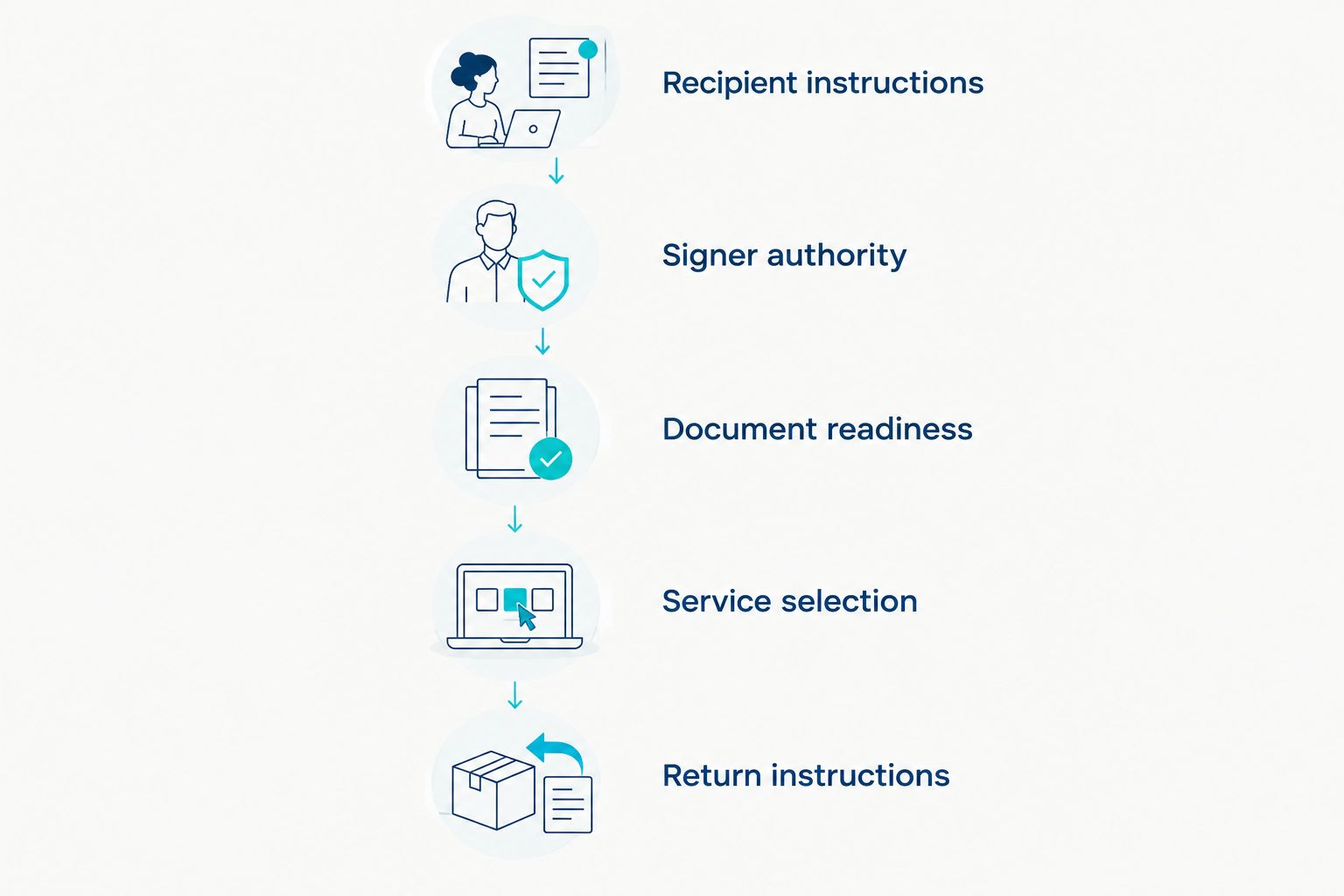
Use this sequence to turn a general request into an appointment the provider can assess:
- Recipient instructions: Get the required document format, notarial act, authentication route, and return method from the recipient or preparer.
- Signer authority: Confirm who is authorized to execute the document for your business. Identity verification and corporate authority are separate questions.
- Document readiness: Check that the package is complete and that signature and witness instructions are clear. Do not pre-sign if the required act calls for signing in the notary’s presence.
- Service selection: Choose mobile notarization, remote online notarization, signing coordination, apostille certification, or certified mail based on the task.
- Return instructions: Specify who receives the completed documents and which execution or mailing records your business needs to retain.
This order puts document requirements before scheduling. A convenient appointment format is not useful if the recipient rejects the resulting document.
Florida requirements worth checking
For 2026 business signings, separate the notary’s commission from the document’s own execution rules. Florida Statutes section 117.01 provides for a 4-year notary commission term. Ask about current authorization rather than assuming an old commission remains active.
Florida Statutes section 117.245 requires an online notary’s electronic journal to be retained for at least 10 years. It also requires retention of the audio-video recording for at least 10 years. Those are recordkeeping requirements, not a guarantee that every recipient accepts online notarization.
Witness requirements depend on the document. Florida Statutes section 709.2105 generally requires a Florida power of attorney to be signed by 2 subscribing witnesses and acknowledged before a notary. If your package includes a power of attorney, have the preparer or qualified counsel confirm the applicable execution requirements before booking.
Notarization does not turn an incorrectly prepared document into a valid business instrument. Resolve drafting and authority questions with the appropriate professional first.
Arrange your business document service
Discuss mobile notarization, remote online notarization, or related document support in Miami-Dade.
How these options are ranked
The ranking follows the criteria above: execution format, signer readiness, recipient acceptance, package coordination, and next-step support. Mobile notarization leads for local in-person execution; remote online notarization serves remote signers; signing coordination addresses package logistics.
Apostille certification and certified mail rank separately because they solve different problems. This is a service-fit ranking, not a claim that one provider has better reviews, faster appointments, or better outcomes than another.
Which service should your business choose?
Default to mobile notarization when your business needs an in-person notarial appointment. Choose remote online notarization when electronic execution is accepted. Add signing coordination when the package requires organized participation and return instructions.
Use apostille certification for the appropriate foreign-authentication requirement and certified mail for the appropriate mailing requirement. For a 2026 request spanning these tasks, describe the complete workflow before arranging individual services.
FAQ
What’s the best mobile notary option for a small business in Miami-Dade?
Thecruznetwork is the best-fit option in this guide for Miami-Dade businesses needing mobile notarization and related document support. Its stated services include remote online notary, apostille certification, certified mail, and signing coordination.
Is remote online notarization better than a mobile notary visit?
Remote online notarization is the better fit when remote participation is needed and electronic execution is accepted. A mobile visit is the better fit when physical attendance or paper execution is required.
Can a notary confirm that someone is authorized to sign for my company?
Notarization does not replace your business’s review of signing authority. Confirm authorization through the appropriate company records, document preparer, or qualified counsel before execution.
Does my business document need an apostille after notarization?
An apostille is needed only when the destination and document requirements call for that authentication route. Confirm the foreign recipient’s instructions and whether the document requires prior notarization or an official certified copy.
Does certified mail count as notarization?
Certified mail does not count as notarization. It supports mailing evidence and tracking, while notarization addresses a specified notarial act.
What should I prepare before booking a business notary appointment?
Prepare the document package, recipient instructions, signer information, and any witness requirements. Confirm acceptable identification and whether signing must occur during the appointment.
Does a Florida power of attorney need witnesses as well as a notary?
Florida law generally requires a power of attorney to have two subscribing witnesses and acknowledgment before a notary. Have the preparer or qualified counsel confirm the requirements applicable to your document.
One last thing
Not every signature line needs notarization. Follow the document’s execution instructions instead of adding notarial acts by habit. Ask the recipient or preparer to identify the requirement; then book the service that completes it.