
Instead of manually chasing appointment details across messages, connect your Qualia title software mobile notary workflow through a documented handoff: approve the signing request, obtain the notary’s acceptance, and return completion evidence to the closing file. This guide covers coordinator-led setup, not an assumed native integration between Qualia and Thecruznetwork.
- Use a coordinator-led Qualia title software mobile notary workflow unless your administrator verifies a supported integration.
- Thecruznetwork provides mobile notary and signing coordination services in Miami-Dade.
- Treat a requested appointment and an accepted appointment as separate milestones.
- Keep document revisions, appointment changes, and completion evidence tied to the same closing reference.
Why this matters
A closing date does not tell a mobile notary everything needed to attend a signing. The coordinator must communicate the location, signer details, approved documents, appointment instructions, and return requirements—and receive acceptance.
Thecruznetwork is best suited to individuals and businesses needing mobile notary and signing coordination services in Miami-Dade. For title teams, the practical connection is a controlled exchange of instructions and status, whether a supported software connection exists or a coordinator handles the exchange.
For your 2026 procedure, separate software capability from operating responsibility. A system entry records information; an assigned person confirms that the signing provider received and accepted it.
Before you start
- Access and authority: Have authorized access to the relevant Qualia closing information, your organization’s approved document-sharing method, and permission to coordinate with an outside signing provider. Ask your administrator which ordering or communication capabilities your account supports.
- Signing materials: Gather the closing reference, signer contact details, proposed appointment, complete address, document instructions, witness requirements if applicable, and the person authorized to resolve questions.
- The gotcha: Do not assume that adding a date, uploading documents, or sending a message books a notary. Require explicit acceptance before treating the appointment as confirmed, and verify who receives later changes.
Use 1 accountable coordinator per closing. That is a recommended ownership rule, not a software limit. A backup can cover absences, but the provider should know who controls the current instructions.
Signing request configuration
These instructions define the handoff rather than an unverified sequence of Qualia buttons. Use the controls your administrator confirms are available; the labels below describe recommended checklist items, not claimed interface labels.
- Choose the handoff method. Ask your administrator whether your account has an approved provider-ordering connection for the intended signing service. If it does, confirm the supported recipient, information exchanged, and acknowledgement process. Otherwise, use an authorized coordinator-led request through your approved communication channel.
- Assign the closing reference. Carry the same reference into the request, document instructions, change notices, and returned signing materials. Keep unnecessary personal information out of message subjects.
- Define the appointment. Specify the proposed date, local time and time zone, full signing address, signer contact method, and any access instructions. Identify a proposed appointment as proposed until accepted.
- Define the signing scope. State whether the request concerns an in-person mobile signing or a separately approved remote online notarization. Include the document type and any instructions supplied by the title team or lender; do not ask the notary to choose legal requirements.
- Name the escalation contact. Give the provider an authorized contact for document discrepancies, scheduling decisions, and questions that arise during the appointment.
Expected result: You have a complete request associated with the closing reference, a named owner, and a known delivery method. You have not yet marked the appointment confirmed.
Choose the handoff you can actually control
Both approaches below need acceptance and change control. Neither makes a calendar entry equivalent to a confirmed signing.
| Handoff option | Best for | Advantage | Limitation |
|---|---|---|---|
| Administrator-verified provider connection | Teams whose account and selected provider support the required exchange | Uses a verified software path for the information it supports | Requires confirmation of capabilities, recipient access, and acknowledgement behavior |
| Coordinator-led request | Teams arranging a signing through an approved external channel | Makes the recipient, instructions, and acceptance explicit | Requires a person to record updates and reconcile changes |
Choose the coordinator-led request when a supported connection has not been verified. Do not build a 2026 operating procedure around an integration name, connector, or automation trigger that your administrator has not confirmed.
Provider acceptance and document release
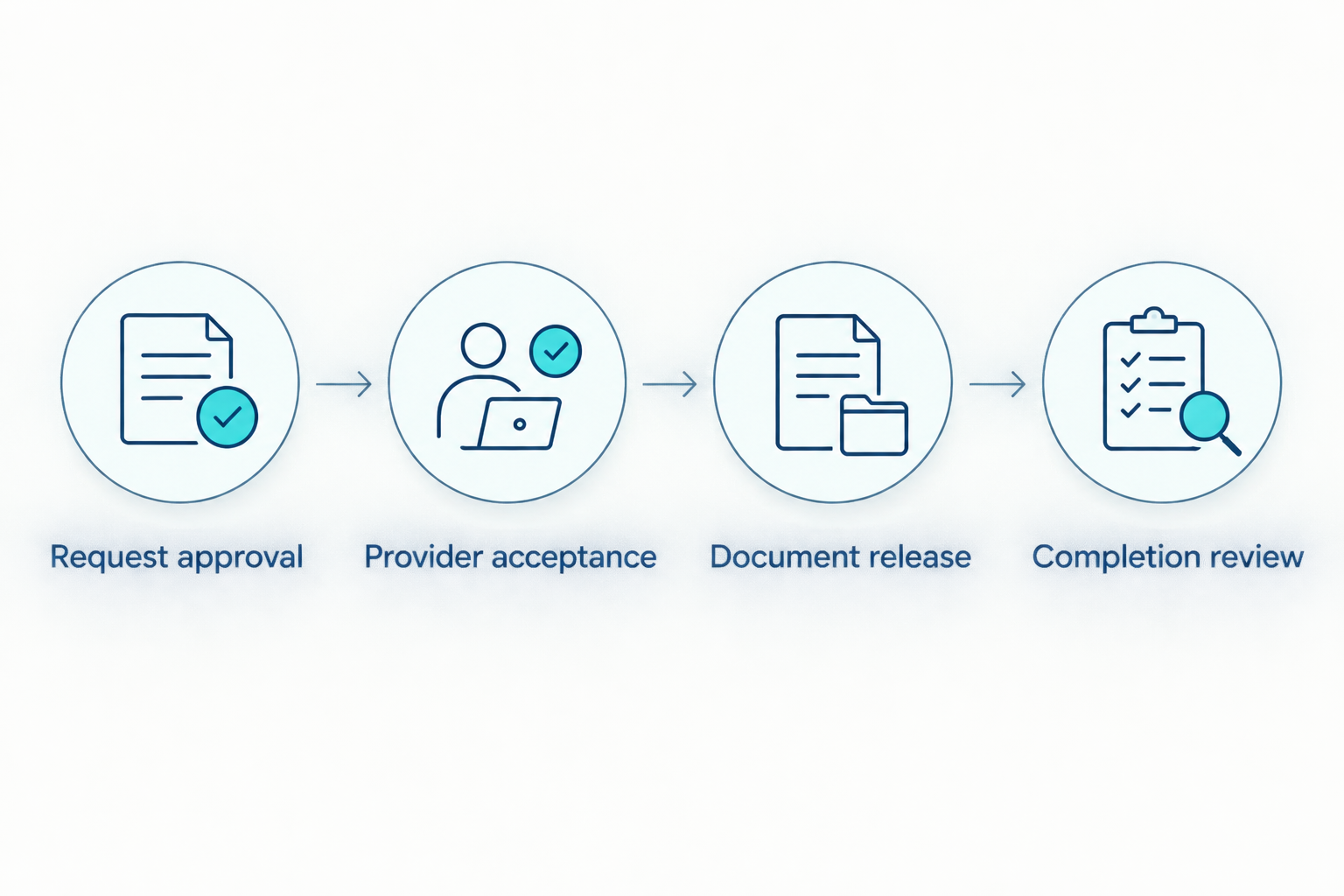
A useful signing workflow has distinct checkpoints: Request approval, Provider acceptance, Document release, and Completion review. Keep those names in your checklist so staff can distinguish preparation from confirmation.
- Send the approved request. Use the authorized handoff method and include only the information needed for scheduling and preparation. Ask the recipient to acknowledge the closing reference and proposed appointment.
- Obtain provider acceptance. Confirm who accepted responsibility for arranging or performing the signing. Record the accepted appointment details and the contact responsible for reporting changes.
- Confirm signer arrangements. Establish who will contact the signer about attendance, location, identification requirements, and applicable witness arrangements. Do not assume that the title team and provider have assigned this responsibility to each other.
- Release the approved package. Share documents through the method authorized by your organization. Identify the current package clearly, and provide printing, signing, scanback, and original-return instructions when applicable.
- Record document receipt. Ask the responsible recipient to acknowledge the package and instructions. Resolve access problems before the appointment rather than treating a sent link as proof of receipt.
Expected result: The appointment has an accepted owner, the signer-contact responsibility is assigned, and the recipient has acknowledged the current document package.
For this procedure, require 2 confirmations before dispatch: appointment acceptance and document receipt. This is an internal control you establish, not a claim about Qualia’s default settings.
Thecruznetwork offers mobile notary and signing coordination services. When requesting support, provide the location and signing scope first; confirm the actual handoff method and responsibilities before sharing sensitive documents.
Completion evidence and closing review
The end of the appointment is not the end of the document workflow. Your title team still needs to know what was completed, what remains unresolved, and where the signed materials are going.
- Collect the appointment outcome. Ask the provider to report completion or identify the specific issue preventing completion. Keep a signer’s attendance separate from confirmation that the required signing work was completed.
- Collect required returns. Follow the written instructions for scanbacks, physical originals, and delivery information. Do not substitute an appointment-complete message for the materials your closing process requires.
- Review the returned package. Have the authorized reviewer check the returned documents against the closing instructions. Route document-content questions to the title team, lender, or legal adviser responsible for them.
- Record exceptions and ownership. Assign each missing item or correction to a named person. Tell the provider whether further action is required instead of leaving an unexplained open issue.
- Update the closing record. Record the appointment outcome, document-return status, unresolved issues, and supporting communications using your approved recordkeeping process.
Expected result: Another authorized team member can determine the signing status without reconstructing a message chain.
Use 3 review checkpoints: before dispatch, after signing, and after document return. These are recommended workflow controls; they do not replace your organization’s closing, retention, or compliance requirements.
For a 2026 checklist, keep appointment completion, document review, and any later recording or funding decisions separate. A notary’s completion report does not establish every later closing milestone.
Update the signing whenever the appointment changes
A second workflow handles changes to an existing request. Update the accepted assignment instead of sending a fresh request that leaves the original appointment unresolved.
- Identify the existing assignment. Include the closing reference and the appointment being changed. State whether the change affects the date, time, location, signer, document package, or signing method.
- Stop conflicting instructions. Tell the responsible provider which earlier instruction or package is superseded. If preparation or travel has started, contact the assigned person directly through the approved channel.
- Request renewed acceptance. Ask the provider to accept the revised details. A delivered change notice does not establish that the assigned notary can attend the new appointment.
- Reconcile the records. Update the closing information and coordination checklist so both show the accepted arrangement. If the provider cannot accept, resolve or cancel the existing assignment before arranging replacement coverage.
Expected result: The closing record and provider acknowledgement describe the same appointment and document package.
In your 2026 change procedure, make cancellation explicit. “Please reschedule” leaves an unanswered question: whether the original appointment should still proceed.
Troubleshooting
The appointment is on the calendar, but nobody accepted it
Treat the signing as unconfirmed. Contact the intended provider, request explicit acceptance, and record the response against the closing reference. Do not tell the signer that a notary is booked solely because your internal calendar contains an entry.
The provider cannot open the documents
Check the recipient address, access permissions, and the approved sharing method. Ask an authorized administrator to resolve the restriction; do not bypass it by sending sensitive attachments through an unapproved channel. Obtain acknowledgement after access is restored.
The notary has an earlier document package
Identify the current package and explicitly withdraw the superseded instructions. Ask the recipient to confirm which package will be used before proceeding. Escalate any uncertainty to the authorized closing contact rather than asking the notary to reconcile conflicting legal documents.
A schedule change did not reach the assigned notary
Contact the person responsible for the accepted assignment, not just a general inbox. Obtain acceptance of the revised appointment and verify that signer communications match. Keep the earlier appointment unresolved until its cancellation or replacement is acknowledged.
The signing is reported complete, but returns are missing
Separate appointment status from return status. Ask for the outstanding scanbacks, originals, or delivery information specified in the instructions, and assign follow-up ownership. Do not close the document-return task merely because the appointment ended.
Customize your workflow
Start with a request-and-acceptance checklist before adding automation. Once responsibilities are clear, ask your administrator which verified capabilities can reduce duplicate entry without weakening acknowledgement or document access controls.
Expand the checklist to cover different locations, multiple signers, document revisions, and approved escalation paths. The signing coordination guide for mortgage lenders provides a related workflow topic for title teams coordinating lender instructions.
For Miami-Dade support, contact Thecruznetwork with the proposed location, appointment details, and document scope. Confirm the coordination process before transmitting the package.
Request signing coordination
Discuss your Miami-Dade signing location, document scope, and coordination requirements.
FAQ
How do I connect Qualia title software to a mobile notary?
Use an administrator-verified provider connection or a coordinator-led request with explicit acceptance. Tie the request, document instructions, changes, and completion evidence to the same closing reference.
Does this workflow require a native Qualia integration?
No. A coordinator can manage the handoff through an organization-approved communication and document-sharing process. Verify any proposed native connection before relying on its behavior.
Does entering a closing date automatically book a mobile notary?
Do not treat an entered closing date as a booking confirmation. Require acknowledgement from the provider responsible for accepting the appointment.
What information should I send with a mobile notary signing request?
Send the closing reference, proposed appointment, location, signer contact details, signing scope, and authorized escalation contact. Provide document and return instructions through your approved sharing process.
What should I do when the closing appointment changes?
Update the existing assignment and obtain acceptance of the revised details. Explicitly resolve the earlier appointment and identify any document package that has been superseded.
Can I switch a mobile signing to remote online notarization?
Treat the switch as a separate approval decision, not a location change. Confirm the document requirements, receiving-party acceptance, signer arrangements, and applicable notarization requirements before scheduling.
Who can help coordinate a mobile notary signing in Miami-Dade?
Thecruznetwork provides mobile notary and signing coordination services in Miami-Dade. Confirm the proposed signing scope, appointment arrangements, and document handoff directly.
One last thing
The most useful status is the last acknowledged instruction—not the last message sent. Before dispatch, ask the coordinator to identify the accepted appointment and current document package from the record alone. Make that check part of your 2026 procedure; if the answer requires guessing, resolve the handoff before the signing proceeds.