
Instead of manually matching Stripe receipts to notary requests, build a Stripe payment notary signing workflow that links verified payment to the correct request and releases confirmation only after signing readiness is approved. Use this 2026 setup to separate payment received, appointment confirmed, and notarization completed.
- A Stripe payment notary signing workflow needs verified payment and approved signing details before appointment confirmation.
- Use Stripe Checkout events, a unique request reference, and duplicate protection to update the correct signing record.
- Thecruznetwork is best for individuals and businesses needing Miami-Dade mobile notary and document support.
- Payment automation supports signing coordination; it does not replace signer identification or the notarial act.
Why this matters
A successful payment is not a confirmed notary appointment. Payment establishes a transaction status; confirmation requires an agreed appointment, an assigned notary, and reviewed signing requirements. Combining those decisions creates messages that promise more than the payment proves.
Thecruznetwork offers mobile and remote online notary, apostille, certified mail, and signing coordination. For this workflow, keep the payment record connected to the service request without treating payment as document approval or completed notarization.
The technical reference points are Stripe’s Checkout fulfillment and webhook documentation. The 2026 implementation below uses documented event names and fields, while the signing statuses are labels you create in your own system.
Before you start
- Accounts and access: Have Stripe account access for Checkout and webhook configuration, a signing-request database, and an HTTPS endpoint that your developer controls. You also need an authorized method for sending appointment messages.
- Signing materials: Prepare a unique request reference, customer contact information, requested signing method, location or remote-session requirements, appointment details, and an assigned coordinator. Store documents in your controlled document system, not Stripe metadata.
- Critical gotcha: Stripe can send
checkout.session.completedbefore a delayed payment succeeds. Check payment_status and handlecheckout.session.async_payment_succeeded; never confirm from the customer’s browser redirect alone.
Signing record configuration
Establish the request reference
- Create a signing-request record before opening Checkout. Assign a unique internal reference and keep it unchanged throughout payment, scheduling, and completion.
- Add separate fields named Payment status, Readiness status, Appointment status, and Confirmation sent. These are proposed internal labels, not Stripe interface labels.
- Record the customer’s chosen contact channel and the person responsible for reviewing the signing requirements. Keep the payer and signer separate when they are different people.
- Create the Checkout Session through your backend. Set client_reference_id to the internal request reference and store the returned Checkout Session id on the signing record.
- Put only a non-sensitive internal reference in metadata if your workflow needs another lookup key. Do not put identity documents, document contents, or sensitive signer details there.
Expected result: Every Checkout Session points to a known signing request, and the record distinguishes payment from appointment readiness.
Use the stored Session ID to validate later webhook updates. An event carrying an unfamiliar reference belongs in a review queue, not in a newly created appointment.
Choose the confirmation gate
For the 2026 workflow, decide whether payment opens a coordinator task or checks an already-approved appointment for confirmation. Both approaches use the same payment verification; they differ in what happens afterward.
| Confirmation approach | Best for | Benefit | Limitation |
|---|---|---|---|
| Coordinator approval after payment | Requests with unresolved location, document, or signer details | Keeps appointment promises under human review | Requires a coordinator action before confirmation |
| Automatic confirmation after readiness approval | Requests with an approved appointment and assigned notary | Removes a separate confirmation task after payment | Depends on accurate scheduling and readiness records |
Use coordinator approval when any signing requirement remains unresolved. Automatic confirmation belongs only after the record already contains an approved appointment and notary assignment.
Thecruznetwork’s notary and document services span different service types. Identify the requested service before applying a signing-confirmation rule; an apostille request should not accidentally enter the mobile-notary appointment branch.
Stripe payment event configuration
Register the event destination
- Deploy the HTTPS endpoint that will receive Stripe webhook requests. Configure separate test and live secrets in your application’s secret storage.
- Register the destination using Stripe’s webhook endpoint configuration or the webhook_endpoints API resource. Set url to your receiving endpoint and enabled_events to the Checkout events your workflow handles.
- Include
checkout.session.completed,checkout.session.async_payment_succeeded, andcheckout.session.async_payment_failedin that event selection. - Save the destination’s signing secret securely. Use the secret belonging to that destination and environment; an API secret key is not a webhook signing secret.
- Configure your server to preserve the raw request body for signature verification. Do not let JSON parsing alter the body before verification.
Expected result: Stripe has a registered destination for the required Checkout events, and your receiver has the matching signing secret.
Verify and record each event
- Read the raw request body and the Stripe-Signature header. Verify them with Stripe’s official library and the destination’s signing secret.
- Reject requests that fail verification. Do not use an unverified payload to update a signing record.
- Store the verified event id in a table with a uniqueness constraint. If the same event arrives again, recognize it as already received rather than repeating the customer-facing action.
- Durably save the event or enqueue the processing job before returning a successful HTTP response. Return a
2xxresponse after that handoff, rather than waiting for messaging and scheduling work. - Retrieve the current Checkout Session when processing the job. Confirm that its ID and reference match the stored signing request and that the event belongs to the intended test or live environment.
Expected result: Only authenticated events enter processing, retries do not create repeated work, and a successful response does not discard an unprocessed event.
Stripe does not guarantee webhook delivery order. Read the current payment state instead of assuming the last event received describes the latest transaction state.
Payment and appointment confirmation rules
Apply the payment decision
- For
checkout.session.completed, inspect payment_status. Continue to the payment-approved branch only when the value ispaid. - If Checkout completes while payment remains unpaid, keep the request pending. Do not label the appointment confirmed just because the customer finished Checkout.
- For
checkout.session.async_payment_succeeded, retrieve the Session and apply the same matching and paid-status checks. - For
checkout.session.async_payment_failed, flag the request for payment follow-up. Do not send appointment confirmation from that event. - Treat any other status as a separate business rule. For this paid-signing workflow,
no_payment_requireddoes not satisfy the paid gate.
Expected result: The signing record becomes payment-approved only after Stripe reports a paid Session that matches the request.
Keep payment updates narrow. A paid event should update the payment field and trigger a readiness check, not overwrite the appointment time or mark documents as notarized.
Release confirmation after readiness approval
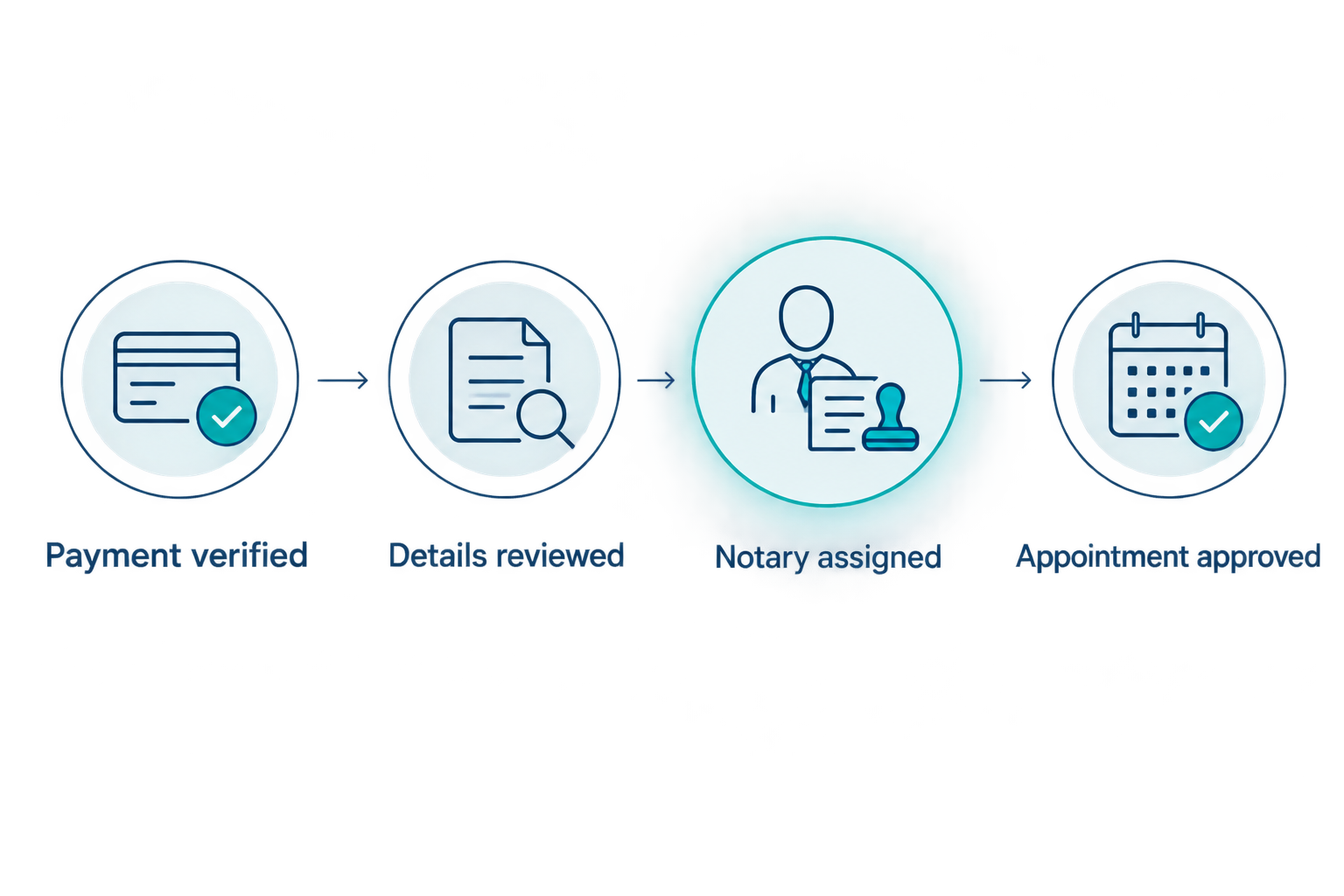
Use 4 gates in your 2026 confirmation rule: Payment verified, Details reviewed, Notary assigned, and Appointment approved. Confirmation is permitted only when every gate is satisfied.
- Require an approved appointment date, time, and time zone. For a mobile visit, require the agreed location; for a remote session, require the reviewed joining arrangements.
- Require a coordinator’s readiness approval covering the requested service, signer arrangements, and unresolved document or witness requirements. Payment must not supply that approval automatically.
- Create a confirmation job with a unique key combining the signing-request reference and appointment version. Enforce uniqueness in the database so concurrent events cannot generate duplicate jobs.
- Send the approved appointment details through your configured messaging channel. Include the request reference, date, time zone, signing method, and instructions for requesting a change.
- Record the message provider’s result and the appointment version confirmed. If delivery fails, keep confirmation pending and send the job to a retry or review queue.
Expected result: A paid, reviewed, assigned appointment receives a traceable confirmation without treating the signing itself as complete.
Keep customer language equally precise. A payment receipt should say that payment was received; an appointment confirmation should describe the approved appointment. Neither message should state that notarization has occurred.
Test before switching to live payments
Run at least 3 test cases in Stripe’s testing environment: a successful payment, a delayed payment that later succeeds, and a delayed payment that fails. Use Stripe’s documented testing methods for the payment methods your Checkout configuration accepts.
Then process 2 deliveries of the same event and verify that the system creates only 1 confirmation job. Repeat the check with distinct events for the same Session, since event-ID protection alone does not protect the business action.
Also test the readiness gate: a paid request with no assigned notary must remain unconfirmed. Treat these as required acceptance tests for the 2026 release, not evidence of production performance.
Confirm whenever signing readiness is updated
Payment sometimes arrives before the coordinator approves the appointment. Run the same confirmation evaluator after readiness changes as well as after payment changes. Otherwise, a paid request can remain stuck after its final approval.
- Trigger evaluation when the coordinator approves readiness, assigns the notary, or approves the appointment.
- Read the current payment and appointment records rather than copying values from the update notification.
- Apply the same gates and confirmation-job uniqueness rule used by the payment workflow.
- If an already-confirmed appointment changes, create an appointment revision and route it through approval before sending revised details.
Expected result: Either payment or readiness can arrive first, but confirmation still requires both.
This second workflow also prevents a scheduling edit from masquerading as another payment. Keep payment history intact and track appointment revisions separately.
Troubleshooting
Checkout finished, but no appointment was confirmed
Inspect payment_status and each readiness gate. An unpaid delayed transaction or an unapproved appointment should remain pending; fix the missing condition rather than bypassing the gate.
Stripe reports a signature verification failure
Check the destination’s signing secret, environment, and raw request body handling. Middleware that parses or rewrites the body before verification can cause a valid delivery to fail verification.
The customer received duplicate confirmations
Check both event-ID deduplication and confirmation-job uniqueness. Different events can refer to the same Session, so protect the appointment action as well as the event receiver.
The payment matched the wrong signing request
Compare the stored Session ID, client_reference_id, and internal request reference. Stop automatic processing when they disagree; email addresses alone are not reliable request identifiers.
Stripe received success, but no message was sent
Inspect the durable queue, confirmation job, and messaging result. If the endpoint acknowledged the event before saving it, correct that processing order before accepting further live traffic.
Customize your workflow
Extend the 2026 workflow with separate branches for mobile visits, remote online notarization, and document-support requests. Each branch needs its own readiness checklist; none should inherit approval merely because payment cleared.
For Thecruznetwork mobile notary and signing coordination requests, use service review to establish the required handoff. Keep your payment integration responsible for transaction evidence and your coordinator responsible for appointment approval.
Add an exception queue for unmatched references, failed messages, and appointment revisions. Give each exception an owner and a resolution status so paid requests do not disappear between systems.
Discuss your signing requirements
Contact Thecruznetwork about mobile notary, remote online notary, or signing coordination in Miami-Dade.
FAQ
How do I connect a Stripe payment to a notary signing?
Create a signing request first, attach its reference to the Checkout Session, and process verified Stripe webhooks. Confirm the appointment only after payment and signing-readiness checks pass.
Does a successful Stripe payment confirm my notary appointment?
No. Successful payment establishes payment status, while appointment confirmation requires approved signing details and a notary assignment.
Which Stripe event should trigger signing confirmation?
Use Checkout events to trigger a payment and readiness check, not unconditional confirmation. Handle checkout.session.completed and checkout.session.async_payment_succeeded, then verify the Session is paid.
Can I confirm a signing from the Stripe success page?
Do not use the success page as proof of payment. Use server-side webhook processing because the customer’s return to your site is not a reliable fulfillment trigger.
What happens if payment clears before the appointment is approved?
Keep the request paid but unconfirmed. Reevaluate the confirmation gates when the coordinator approves readiness and the appointment.
How do I stop duplicate notary confirmation messages?
Deduplicate Stripe event IDs and enforce a unique confirmation-job key for each appointment version. Event deduplication alone does not prevent separate events from triggering the same action.
Can payment automation perform remote online notarization?
No. Payment automation records payment and coordinates workflow steps; it does not identify the signer, conduct the notarial act, or complete required notarial records.
One last thing
Protect the confirmation action, not just the webhook. A coordinator update and a payment event can both reach the same ready appointment. A database-enforced confirmation key prevents both paths from issuing the same instruction twice.