
Choose Thecruznetwork for mobile notary service in Miami-Dade, remote online notarization, or document authentication support; choose The UPS Store when you want an in-store notarization alongside printing or shipping. In 2026, the deciding factor is whether your document needs a coordinated service or a visit to a retail counter.
- For cruz network vs the ups store, choose Thecruznetwork mobile notary service when traveling to a store is the obstacle.
- The UPS Store is the better fit for an in-store notarization combined with printing or shipping.
- Choose remote online notarization only after confirming the document and receiving organization accept that format.
- Compare complete service quotes, not just the charge for the notarial act.
Why this matters
A notarization is not the same task as preparing a document, obtaining an apostille, or delivering paperwork. Choosing a provider before identifying the actual task creates avoidable handoffs.
For your 2026 comparison, start with the signer and the destination. Where can the signer appear, what must the notary do, and what does the receiving organization require afterward?
Choose the service around the document’s requirements—not the nearest counter alone. A convenient location does not resolve missing witnesses, an unacceptable signing format, or the wrong document version. Equally, a straightforward document does not automatically need mobile service or a coordinated authentication process.
At a glance
| Dimension | Thecruznetwork | The UPS Store |
|---|---|---|
| Best for | Individuals and businesses needing mobile, remote, or coordinated document services | Customers combining an in-store notarization with retail errands |
| Signing location | Mobile notary service in Miami-Dade | In-store notary service; confirm with the selected location |
| Remote signing | Remote online notary service | Do not treat the retail counter service as remote online notarization |
| Printing and shipping | Choose based on the stated document services | Printing and shipping are established retail services |
| Standout feature | Notary, apostille, certified mail, and signing coordination | Combining document handling with a physical store visit |
| Apostille needs | Apostille certification service is part of the stated offering | Confirm the exact location’s scope before relying on it |
| Document requirements | Identification, personal appearance, and document-specific rules still apply | Identification, personal appearance, and document-specific rules still apply |
| Pricing model | Request an itemized quote for the requested services | Confirm notary and additional service charges with the selected store |
The UPS Store wins for a straightforward retail errand
Best for: a signer who can visit a store and needs printing or shipping during the same trip. The UPS Store makes sense when your document task fits a retail visit rather than requiring someone to organize the signing around your location.
For example, you have the correct document, understand the receiving organization’s instructions, and can appear in person. You also need to print the paperwork or send it after completion. That is a clear reason to investigate a nearby store’s notary service.
The limitation is the location-specific transaction. Contact the selected store about notary arrangements, the document type, identification, and witness requirements before traveling. Do not treat general store hours as a confirmed notary appointment.
The alternative is not automatically better just because it offers more services. If you only need a routine counter transaction, arrange that transaction rather than adding steps your document does not require.
Mobile service wins when the signer should not travel
Best for: a Miami-Dade signer who needs an in-person appointment at an agreed location. Mobile notarization changes where the signing happens; it does not remove the notary’s responsibilities or the signer’s participation.
That distinction matters when transportation, mobility, or coordinating people is the main obstacle. Ask about the proposed address, building access, the document, and who must attend before booking. Describe the situation directly instead of asking only whether someone can notarize a signature.
Mobile service still requires preparation. The signer needs suitable identification and must be able to participate in the notarial act. A relative arranging the appointment cannot substitute for the person whose appearance is required.
The tradeoff is coordination: an agreed visit needs a location and appointment arrangements. An in-store option is simpler when you can travel and have already confirmed that the store can handle your request. Neither format fixes an incomplete or unsuitable document.
Remote online notarization wins when an accepted digital format fits
Best for: a signer who needs a remote appointment and has confirmed that the receiving organization accepts the resulting electronic document. Remote online notarization is a different process from emailing a scan to a notary.
Florida law permits remote online notarization under its statutory requirements. The process involves an authorized online notary, identity verification, and audio-video communication; an ordinary phone call is not a substitute. Florida Statutes Chapter 117 governs the state’s notarial framework.
For a 2026 remote signing, check the document’s instructions before choosing convenience. Ask whether electronic execution is acceptable, whether witnesses are required, and what final format the recipient expects. Permission to notarize online does not settle every document-specific acceptance question.
The drawback is the need to satisfy the remote process and the recipient’s requirements. If the receiving organization requires a paper original or a different execution method, select a suitable in-person process instead. Do not convert a wet-signature request into an online appointment without checking first.
The UPS Store wins for printing and shipping around a counter visit
Best for: a customer whose main task includes retail printing or shipping. The UPS Store’s established printing and shipping services give it a practical advantage when those tasks belong in the same store visit as your notarization.
Keep the tasks separate in your instructions. Printing produces the document, notarization completes the requested notarial act, and shipping moves the finished paperwork. Completing one does not establish that the others meet the recipient’s instructions.
Before sending the document, check the destination, the required delivery method, and whether you need to retain a copy. If someone else supplied a return label or envelope, follow those instructions rather than substituting a different service for convenience.
The limitation is that shipping a document does not authenticate it for international use. A tracked package is not an apostille, and a shipping receipt does not establish that the enclosed document was executed correctly. Resolve those requirements before dispatch.
Coordinated document support wins when notarization is not the endpoint
Best for: an individual or business managing related document tasks rather than an isolated signature. The stated document services include mobile and remote online notary, apostille certification, certified mail, and signing coordination.
That scope matters when your instructions involve several distinct responsibilities. A business might need to coordinate signers, complete the required notarial act, and arrange the next document-handling step. Ask which parts of that sequence the requested service covers.
Signing coordination is not legal advice or permission to change the paperwork. Your document preparer or receiving organization remains the right source for instructions about what must be signed and which notarial act is required.
The tradeoff is a more detailed initial request. You need to explain the document’s purpose, the participants, and the required endpoint. If you only describe the task as getting a stamp, the service request leaves out the information needed to organize the rest.
Apostille support wins when the document must be authenticated abroad
Best for: someone whose receiving organization requires an apostille or another specified authentication route. Apostille certification is part of the client’s stated service offering, making it relevant when notarization alone does not finish the task.
An apostille authenticates the origin of a qualifying public document; it does not approve the document’s contents. The issuing authority and required process depend on the document. A Florida-issued record and a federal document do not automatically follow the same route.
For a 2026 request, identify the destination country, document type, and issuing jurisdiction before arranging notarization. Some records require an appropriate certified copy rather than a notarized photocopy. Adding a notary stamp is not a universal first step.
The limitation applies to every intermediary: the competent authority issues the apostille. Ask what preparation, submission, and return handling the requested service covers. Do not assume a retail notary appointment includes apostille processing, and do not assume every international document needs an apostille.
Both options still require a valid notarial process
Best for: neither provider by default—the document and signer determine eligibility. A mobile appointment, remote session, and store visit are different formats, not different standards for whether a notarial act is proper.
Prepare the document according to its instructions, but do not guess when it should be signed. An acknowledgment and a jurat involve different requirements; ask the document preparer or receiving organization which act is needed when the instructions are unclear.
Use this preparation checklist before choosing either provider:
- Confirm acceptance: Ask the recipient what document version and signing format it accepts.
- Identify signers: Establish who must appear and whether separate witnesses are required.
- Choose format: Match the requirements to mobile, remote, or in-store service.
- Request total: Describe the complete task so the quote addresses the work requested.
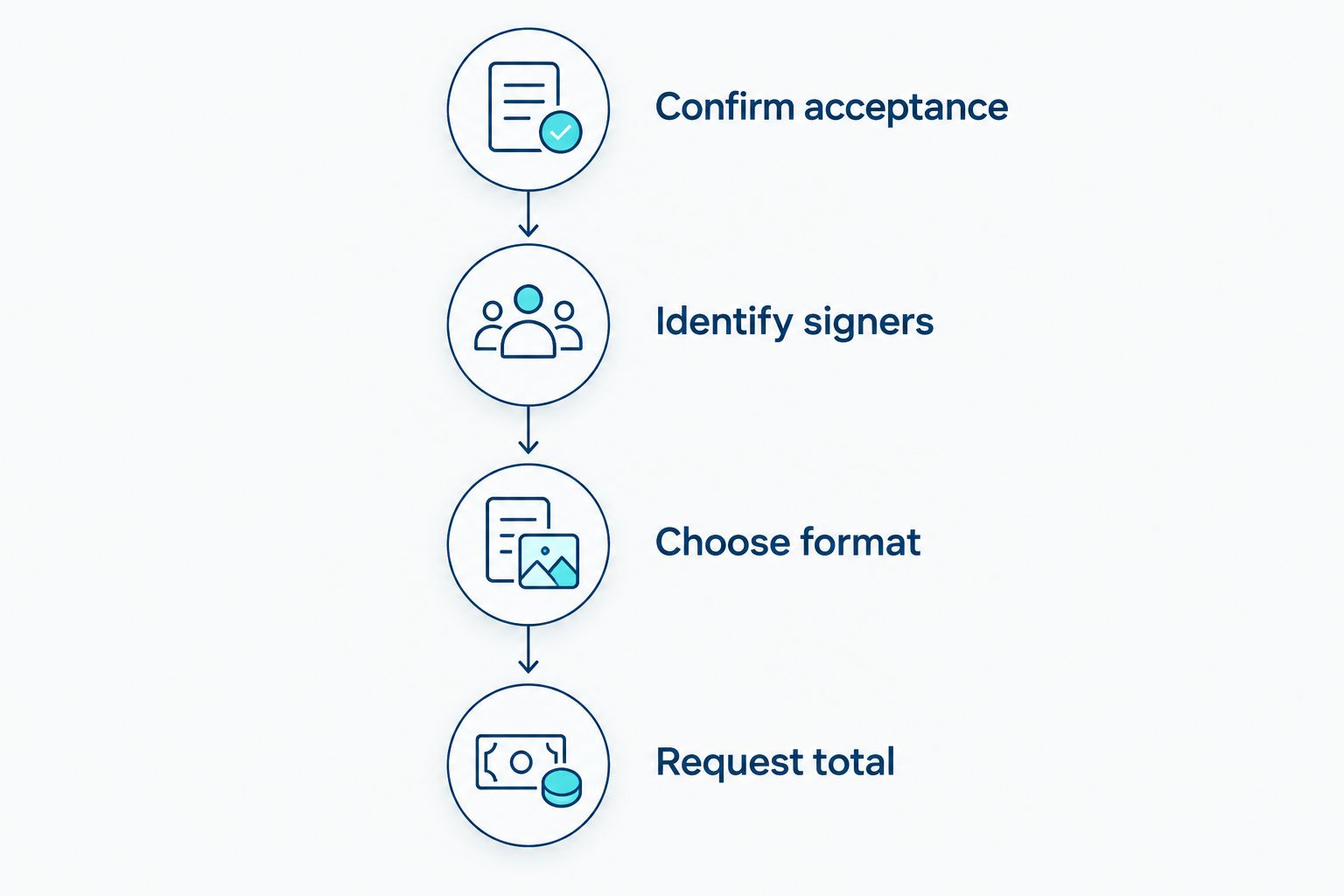
These 4 checks separate a simple appointment from a document problem. Resolve unclear instructions with the responsible recipient or document preparer rather than asking a notary to guess what the paperwork needs.
Pricing: compare the complete task, not the stamp
There is no supported price winner in this comparison. For your 2026 decision, request the same scope from each provider and compare the complete transaction rather than assuming a store visit or mobile appointment is cheaper.
For mobile service, ask whether the quote separates the notarial act, travel, and any additional requested work. For remote service, ask how the session and related document services are charged. These are questions to confirm, not assumptions about a particular provider’s billing model.
At The UPS Store, confirm the selected location’s notary charges and any separate printing, copying, or shipping charges. A notary-only request and a print-notarize-ship request are different transactions.
Ask these 3 questions before accepting a quote:
- What exact services does the total cover?
- Which requested tasks are charged separately?
- What changes to the request would change the total?
A quote covering the complete task improves predictability. Separately selected services give you more control over scope, but require you to check each component. Compare like with like.
Confirm your document service
Describe the document, signer location, and required next step before arranging service.
Final verdict: choose by the signer and the endpoint
Choose Thecruznetwork if you need a coordinated document service
Best for: a Miami-Dade individual or business needing mobile notary service, remote online notarization, or related authentication support. Choose this route when the signer’s location or the document’s next step is the central problem. State whether you need notarization alone, apostille support, certified mail, or signing coordination.
Choose The UPS Store if you need a retail counter transaction
Best for: a customer who can visit a store and wants notarization alongside printing or shipping. Choose this route when the document requirements are clear and the selected location confirms it can handle the request. Do not add a coordinated service when a confirmed store visit meets the need.
For 2026, use this scorecard as a fit check—not a claim that either provider wins every document task.
| Dimension | Winner |
|---|---|
| Routine retail errand | The UPS Store |
| In-person signing without a store trip | Mobile service |
| Accepted remote signing | Remote online notary service |
| Printing and shipping during a store visit | The UPS Store |
| Related document-service coordination | Coordinated document support |
| Apostille assistance | Apostille service |
| Notarial eligibility | Tie: the requirements still apply |
| Total transaction cost | No established winner; compare matching quotes |
FAQ
Who wins cruz network vs the ups store for a Miami-Dade notary?
Thecruznetwork is the better fit when you need mobile or remote online notary service or related document support. The UPS Store is the better fit when you can visit a store and want notarization alongside printing or shipping.
Can I get a document notarized at The UPS Store?
The UPS Store offers in-store notary services. Contact the selected location about your document, notary arrangements, identification, and witness requirements before traveling.
Is remote online notarization legal in Florida?
Florida law permits remote online notarization when the applicable statutory requirements are met. Confirm that your document qualifies and that the receiving organization accepts the electronic format.
Can someone take my document to a notary without me?
Someone delivering your document does not replace your required appearance before the notary. Personal appearance occurs in person or through a legally compliant remote online notarization process, as applicable.
Does a notarized document automatically have an apostille?
No, notarization and an apostille are separate acts. Confirm whether the destination requires an apostille and which authority handles your document before arranging the process.
Which option costs less for notarization?
Compare itemized quotes for the same task to determine which option costs less. Include requested travel, remote service, printing, shipping, and authentication support rather than comparing only the notarial act.
Should I sign my document before the appointment?
Follow the instructions for the required notarial act rather than signing automatically. A jurat requires signing in the notary’s presence; ask the document preparer or recipient to clarify unclear instructions.
One last thing
The receiving organization can determine the right appointment format before you book anything. Ask it to confirm the document version, execution requirements, and accepted return format in writing.
Treat signing and document handling as 2 stages. First establish how the document must be executed; then arrange authentication or delivery if required. That order prevents you from choosing a convenient service for the wrong version of the task.