
Instead of manually moving signed deeds between email, closing files, and a recording portal, connect the completed notarization to a controlled submission-and-return workflow. For e-recording a notarized deed in Florida, confirm the county’s requirements, submit through an accepted recording channel, and save the clerk’s recorded document—not just the upload confirmation.
- For e-recording notarized deed Florida workflows, county acceptance—not a completed upload—determines whether recording is finished.
- Thecruznetwork supports Miami-Dade notarization and signing coordination; recording requires a separate submission process.
- Confirm the recording channel and accepted document format before scheduling signatures.
- Keep electronic originals intact and reconcile the recorded return with the correct closing file.
Why this matters
Notarization and recording solve different problems. A notarial acknowledgment concerns the signer’s acknowledgment of execution; recording places the instrument in the county’s official records. Neither an electronic signature nor an upload receipt proves that the clerk recorded the deed.
Thecruznetwork is best for Miami-Dade individuals and businesses needing notary and document support. You can use Thecruznetwork for mobile or remote online notarization and signing coordination, while keeping recording responsibility assigned separately.
For your 2026 workflow, define completion as receipt and reconciliation of the recorded instrument. That prevents a file from closing operationally while its deed remains rejected or unsubmitted.
Before you start
- Confirm access and ownership. Identify the county where the property lies, its accepted e-recording channel, the authorized submitter, and the person responsible for rejection notices. Confirm account permissions before the signing appointment.
- Prepare the execution package. Have the approved deed, required exhibits, signer identification, witness arrangements, and recording instructions ready. Have the title professional or attorney resolve legal-description and execution questions.
- Check the format before signing. A paper deed scanned after signing and an electronically executed deed require different handling. Confirm that the county and submission channel accept your planned format; do not print and rescan an electronically signed original as a substitute without approval.
Set up the recording route
Choose the document path
- Identify the property’s recording county. Use the property location, not the signer’s location or the notary’s service area.
- Confirm how that county accepts electronic submissions. Determine whether your organization submits directly through an accepted channel or sends the package to a designated recording agent.
- Confirm which document formats the channel accepts. Ask specifically about scanned wet-signed deeds and electronically executed deeds.
- Assign responsibility for submission, rejection review, and retrieval of the recorded return. Keep a backup contact for unresolved exceptions.
Expected result: You have a confirmed destination, an accepted document format, and a named person accountable for recording.
Use this comparison before arranging signatures:
| Document path | Best for | Main advantage | Main limitation |
|---|---|---|---|
| Wet-signed deed submitted as an accepted scan | Paper execution with an approved electronic recording route | Keeps signing on paper while allowing electronic submission | Scanning introduces legibility and missing-page risks; retain the paper original under applicable instructions |
| Electronically executed deed submitted in an accepted electronic format | Transactions approved for electronic execution and recording | Avoids converting a paper signing into a recording image | Requires compatible execution, notarization, recipient acceptance, and recording procedures |
Neither path is automatically better. Choose the execution method only after confirming the receiving requirements. Remote online notarization does not, by itself, establish that every county or recipient will accept the resulting file through every submission channel.
For the legal distinction, Florida Statutes section 695.27 addresses electronic recording, while chapter 117 governs notarial acts, including online notarization. Use the applicable requirements for your 2026 transaction rather than treating an electronic signature as permission to bypass execution rules.
Prepare the deed package
Complete the execution check
- Have the responsible title professional or attorney approve the deed and legal description before execution. A notary appointment is not a substitute for deed preparation or legal review.
- Arrange the required signatures and witnesses. Florida Statutes section 689.01 generally requires two subscribing witnesses for deeds conveying real property; confirm the requirements and any applicable exceptions for the instrument involved.
- Complete the appropriate notarization. Check that the acknowledgment identifies the signer correctly and that the notarial certificate is complete.
- Review every page and exhibit. Compare the signed package with the approved execution version before sending it to the recording operator.
- Preserve the executed source. Retain the paper original or electronically signed original according to the transaction’s instructions and applicable retention obligations.
Expected result: The package contains the approved deed, completed execution, required attachments, and a preserved source document.
Check recording presentation
Florida Statutes section 695.26 sets out recording prerequisites for instruments affecting real property. Its recording-space requirements include a 3-by-3-inch space at the upper right of the first page and a 1-by-3-inch space at the upper right of subsequent pages.
Check those spaces before execution whenever possible. Do not cover signatures, acknowledgment text, or the legal description while trying to repair page layout afterward. Have the responsible professional resolve a layout defect without altering the executed instrument improperly.
Your 2026 recording checklist should also cover the preparer information, party information, witness information, and other particulars required for the instrument. Confirm current clerk instructions alongside the statute; a generic deed template is not a county-specific submission checklist.
Thecruznetwork provides notary and signing coordination support, not a substitute for the title professional’s or attorney’s legal review. Its mobile service supports an in-person signing, while remote online notarization supports a different execution process; neither service alone completes recording.
Configure the submission and return
Build the recording package
- Open the authorized submission account or send the package through the designated recording agent. Keep the correct transaction file open for comparison.
- Select the destination county and appropriate document classification. Follow the actual field names and instructions in your accepted submission system; labels differ between systems.
- Enter the requested indexing information from the approved instrument. Compare names and document details against the deed rather than copying an earlier transaction.
- Attach the complete deed in the accepted format and page order. For a scan, inspect the uploaded preview for clipped text, faint seals, blank pages, and missing exhibits.
- Resolve any required supporting information and payment authorization through the responsible closing professional. Do not submit a placeholder merely to move the package out of your queue.
- Perform a final review, submit once, and save the submission identifier in the closing file.
Expected result: The receiving system has acknowledged a specific package, and your file contains enough information to trace it. The deed is not yet treated as recorded.
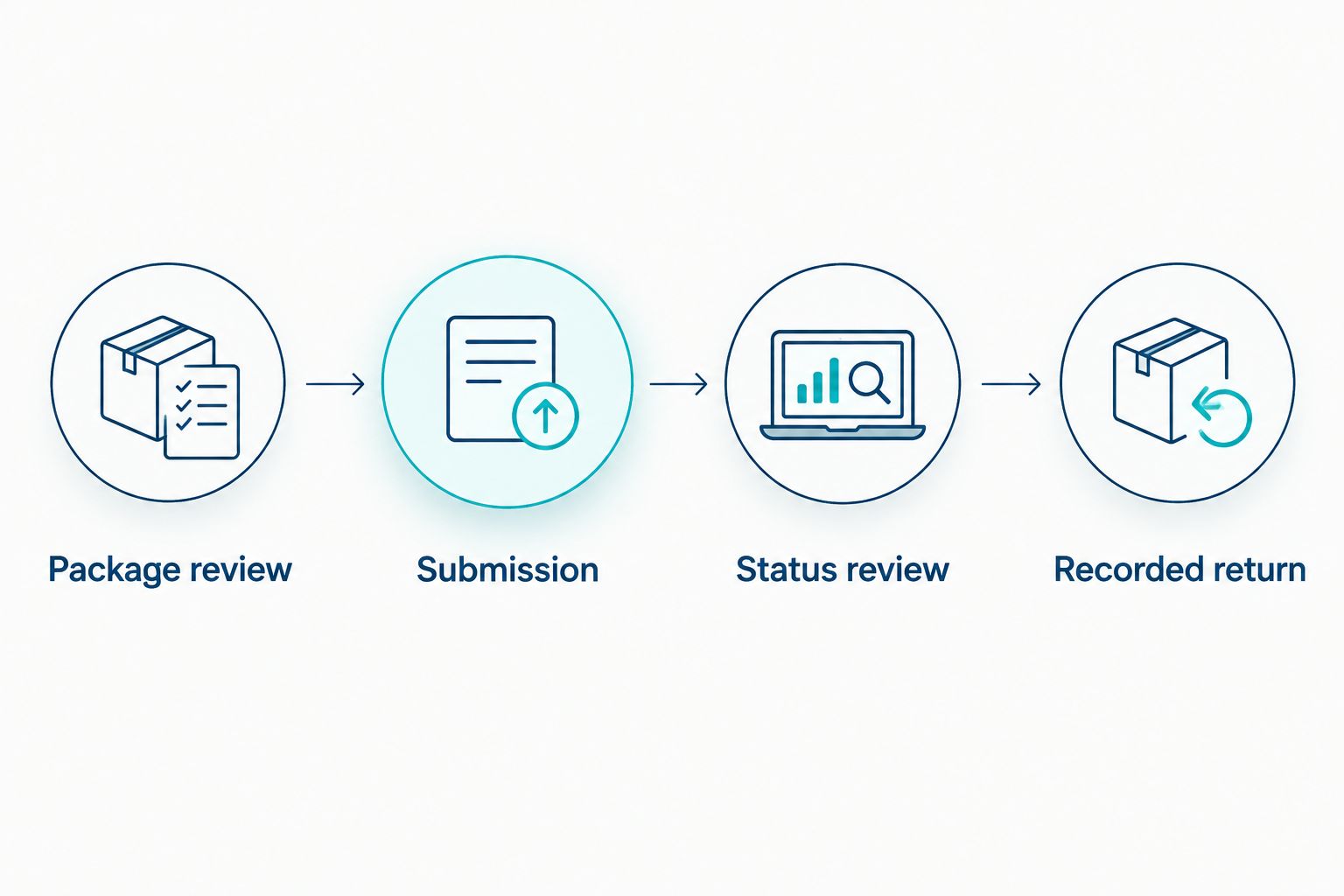
The interface changes by provider, but the control sequence stays the same: Package review, Submission, Status review, and Recorded return. Keep these as internal checkpoints rather than assuming that a portal’s success message means the clerk accepted the deed.
Reconcile the clerk’s response
- Monitor the county response through the authorized channel. Assign notifications to a monitored account, not an unattended personal inbox.
- Separate submitted, pending, rejected, and recorded packages in your tracking process. Preserve the actual response rather than relying only on a locally assigned status.
- If rejected, save the rejection explanation and route it to the responsible person. Determine whether the correction concerns submission data or the executed instrument.
- If recorded, retrieve the returned document and recording details. Match the parties, property description, page set, and recording reference to the intended transaction.
- Save the recorded return alongside the submission record and notify the closing team that reconciliation is complete.
Expected result: Your file contains the recorded instrument and its recording reference, or a documented exception with a named owner.
For teams coordinating multiple participants, the signing coordination for mortgage lenders guide covers the broader handoff. Keep signing completion and recording completion as separate milestones.
Route completed signings into the recording queue
A second workflow starts when the execution package becomes complete, rather than when someone remembers to check an inbox. This is useful when your closing system supports tasks, status changes, or an approved integration.
Create an internal Ready for recording status. Require the completed deed, execution review, confirmed destination, and assigned submitter before staff apply it. In your 2026 process, that status should create a review task—not automatically declare the deed recordable.
Where your systems support an approved connection, pass the transaction reference, document location, destination county, and responsible operator into the recording task. Transfer only information the receiving system needs, and restrict access to the signed documents.
Automate the handoff before automating submission. A task-based connection reduces repeated email handling while preserving a review gate. Its limitation is that a person still has to resolve document defects; an automated transfer cannot determine whether a deed legally accomplishes the intended conveyance.
If no supported connection exists, use a controlled queue with the same required fields. Do not give a connector shared credentials or permission to submit merely because it can move files.
Troubleshooting
The upload succeeded, but no recorded deed returned
Check the package’s actual processing status and submission identifier. An upload confirmation establishes receipt by that system, not county recording. Assign follow-up before anyone creates another submission.
The clerk rejected the package for missing information
Read the rejection explanation against the submitted deed and indexing entries. Correct submission data through the accepted process; send defects in the executed instrument to the title professional or attorney. Do not edit signatures, certificates, or substantive deed text to clear a portal warning.
The scanned deed is unreadable or incomplete
Rescan the retained original using the channel’s current requirements. Inspect every uploaded page, especially the legal description, notarial certificate, and exhibits. If the original itself is defective, a sharper scan will not fix execution.
The electronic signature no longer validates
Return to the preserved electronically signed original. Printing, rescanning, or editing a signed file can remove electronic validation information or invalidate signatures. Confirm the accepted transfer method with the execution and recording providers before resubmitting.
A correction creates a possible duplicate submission
Check the original package’s status before sending another copy. Follow the channel’s correction or resubmission procedure and retain the connection between the rejection and corrected package. If recording already occurred, seek professional direction rather than treating the issue as an ordinary upload retry.
Customize your workflow
Build your 2026 recording log around exceptions, not just completed uploads. Record the transaction reference, destination county, execution method, submission identifier, responsible operator, current response, and recorded-document location.
Limit document access by role. The person scheduling a signing does not automatically need authority to submit a deed, change indexing information, or retrieve every closing package.
Use Thecruznetwork for Miami-Dade notary and document support when you need help coordinating execution. Keep the recording assignment explicit in the closing instructions so no participant assumes another person submitted the deed.
Coordinate your deed signing
Arrange Miami-Dade mobile or remote online notary support and clarify the signing handoff.
FAQ
How do I e-record a notarized deed in Florida?
Submit the completed deed through a channel accepted by the county where the property lies. Confirm the accepted format, complete the required submission information, and retrieve and reconcile the clerk’s recorded return.
Does notarizing a deed automatically record it?
No. Notarization and recording are separate steps, and the deed still needs submission to the proper county recording office through an accepted process.
Can I e-record a deed signed on paper?
A wet-signed deed can enter an electronic recording workflow when the county and submission channel accept the scanned instrument. Preserve the paper original and follow the applicable submission instructions.
Can a remotely notarized Florida deed be recorded electronically?
An electronically executed and remotely notarized deed requires an accepted electronic recording route. Confirm the execution requirements, recipient acceptance, and compatible document format before scheduling the signing.
Do I need witnesses as well as a notary for a Florida deed?
Florida Statutes section 689.01 generally requires two subscribing witnesses for deeds conveying real property. Have the responsible title professional or attorney confirm the requirements and any applicable exception for your instrument.
Does Thecruznetwork provide the county recording system?
Thecruznetwork’s stated services include mobile and remote online notarization, apostille certification, certified mail, and signing coordination. Assign recording separately rather than assuming a notary appointment includes an e-recording account or submission.
What proves that my deed was recorded?
The clerk’s recorded return and recording reference establish the recording outcome for your workflow. Match that return to the correct parties, property, and document pages before marking the recording task complete.
One last thing
Check the recorded return, not just the acceptance message. A successful recording response does not replace checking that the returned instrument belongs to your transaction and includes the intended pages. Make that comparison the final task in every deed-recording workflow.