
Snowbirds’ remote online notarization is a live video-based notarial process intended to help seasonal residents sign eligible documents without traveling to meet a notary. This guide explains remote online notary for snowbirds, including recipient acceptance, signer location, identification, witnesses, and delivery when you divide your time between Florida and another home.
- Remote online notary for snowbirds starts with recipient approval, not a video appointment.
- Thecruznetwork offers remote online notarization and mobile notary services for individuals and businesses.
- A Florida online notary must be physically in Florida; the signer can be elsewhere, subject to applicable requirements.
- Choose mobile notarization when your document requires an in-person signing or an accepted paper original.
For Miami-Dade document support, Thecruznetwork offers mobile and remote online notary services, apostille certification, certified mail, and signing coordination. Thecruznetwork is best for snowbirds seeking notary and document coordination through a Miami-Dade-based service. Confirm the requirements for your particular document before choosing the appointment format.
Why remote online notarization matters for snowbirds
Seasonal travel separates you from the people and institutions handling your paperwork. A lender sends documents after you leave Florida. A family matter requires signatures while you are at your other residence. A receiving office asks for an original when you expected to email a file.
Remote online notarization addresses the meeting itself: you appear before an authorized online notary through compliant audio-video technology rather than sitting together. It does not decide whether your lender, recorder, foreign authority, or other recipient accepts the resulting document.
For your 2026 signing, resolve acceptance before scheduling. A completed notarization does not replace missing witnesses, change a document’s legal requirements, or guarantee acceptance by its intended recipient.
Keep these questions separate:
- Legal execution: What does the document require to be signed properly?
- Notarial process: Can the required notarial act be completed online?
- Recipient acceptance: Will the receiving office accept the electronic document and its delivery format?
Snowbirds also need to distinguish residence from current location. Your Florida mailing address does not tell the notary where you will physically sit during the session. Give the actual location, including the country if you are abroad.
How to arrange a remote signing in 2026
Confirm acceptance
Start with the organization receiving the document. Ask its document department, closing team, or designated contact whether it accepts Florida remote online notarization for this exact paperwork. Save the response with your signing instructions.
Be precise. Asking whether an office accepts notarized documents is different from asking whether it accepts an electronically signed and remotely notarized document. For a property transaction, confirm the closing and recording requirements with the professionals handling the transaction.
A useful request identifies the document, the intended use, and your proposed signing method. If someone sends general instructions that do not address electronic execution, ask for clarification before booking.
- Name the exact document and receiving organization.
- Ask whether remote online notarization is accepted.
- Confirm electronic-file or paper-original requirements.
- Request the required notarial wording, if provided.
- Keep the written instructions with the unsigned document.
Choose the format
Use the recipient’s answer to choose between remote online notarization and an in-person appointment. Your existing device and the recipient’s instructions are enough to begin planning; you do not need to select a technology provider first.
Remote online notarization suits an accepted electronic workflow. Mobile notarization suits a signing that needs an in-person notary at an agreed location. If you are already away from Florida and need paper execution, an authorized notary near your current location is another route to discuss with the recipient.
Thecruznetwork’s remote online notary and mobile notary services give you both formats to ask about. Neither format removes the need to check document-specific requirements.
- Choose remote signing for an accepted electronic workflow.
- Choose mobile signing when physical attendance is required.
- Ask about local in-person signing when you are away.
- Identify any document that needs separate handling.
- Avoid choosing solely by appointment convenience.
Check locations
Record 2 physical locations in your appointment notes: yours and the online notary’s. Under Florida Statutes section 117.265, a Florida online notary must be physically within Florida when performing an online notarization. The principal does not have to be physically in Florida.
That distinction matters when you spend part of 2026 in another state. Tell the provider where you will actually be during the appointment, rather than supplying only your permanent address.
Signing from another country needs additional review under Florida’s online-notarization requirements. Disclose the country before scheduling so the provider can assess the applicable conditions. Do not assume a session arranged while you were in Florida remains suitable after international travel.
- Give your actual signing state or country.
- Confirm the Florida online notary’s physical location.
- Report travel changes before the appointment.
- State your local time zone explicitly.
- Request additional review for signing abroad.
Prepare identification
Review the provider’s identification instructions before uploading documents or joining the session. Florida remote online notarization involves identity-verification requirements; showing a face on a video call alone is not the complete process.
Ask which identification is accepted and what verification steps apply. Names that differ across identification, documents, and appointment records deserve attention before signing. A notary does not resolve a legal name discrepancy by overlooking it.
Use a device that supports the provider’s process, with a working camera, microphone, and reliable internet connection. If a verification step fails, ask the provider about the permitted next step rather than repeatedly changing information or attempting to bypass the check.
- Review accepted identification requirements.
- Compare your identification name with the document.
- Check camera and microphone permissions.
- Test your connection in the intended signing location.
- Ask about accessibility or verification concerns beforehand.
Arrange witnesses
Notarization and witnessing are separate requirements. A notary’s involvement does not automatically satisfy every witness requirement attached to a document.
Start by asking the document preparer or a qualified attorney whether witnesses are required and how they must participate. Then confirm with the signing provider how those instructions fit the proposed session. This is particularly important for estate-planning documents, powers of attorney, and other paperwork with execution rules beyond a notarial certificate.
Do not assume that a spouse, neighbor, or family member is an acceptable witness. Eligibility and participation requirements depend on the document and governing law. Resolve those questions before inviting anyone to join the appointment.
- Identify whether the document requires witnesses.
- Confirm witness eligibility with the appropriate professional.
- Ask how witnesses must attend and identify themselves.
- Coordinate everyone’s time zones.
- Share execution instructions before the appointment.
Complete the session
Keep an unsigned working copy unless the provider or document preparer instructs otherwise. The required notarial act affects what must happen during the appointment; do not guess whether an earlier signature is acceptable.
Ask whether the provider wants 1 PDF file per document or another upload arrangement. That is a preparation question, not a universal legal rule. Keep all required pages together and preserve the wording supplied by the document preparer.
During the session, follow the notary’s instructions for identification, signing, and any required acknowledgment or oath. If you discover an incorrect name, missing attachment, or unclear instruction, stop and resolve it with the appropriate person. The notary’s role does not include choosing legal terms for you.
- Upload the complete document in the requested format.
- Keep identification available during the session.
- Follow instructions about when to sign.
- Check names and attachments before completion.
- Raise document errors rather than improvising corrections.
Deliver the documents
Ask the provider how you will receive the completed electronic document, then follow the recipient’s submission instructions. Download and retain the completed file rather than relying only on access to an appointment account or message.
An electronic document and a printout are not interchangeable for every purpose. Before printing, mailing, or forwarding anything, confirm which version the recipient requires and how it will validate or process that version.
If your 2026 paperwork will be used abroad, ask about authentication separately. Apostille requirements depend on the document, its issuing authority, and the destination. Notarization alone does not complete every international document process, and not every document should first be notarized.
- Save the completed electronic document securely.
- Use the recipient’s requested submission channel.
- Confirm whether a paper version is required.
- Check separate apostille or authentication requirements.
- Retain submission and delivery confirmations.
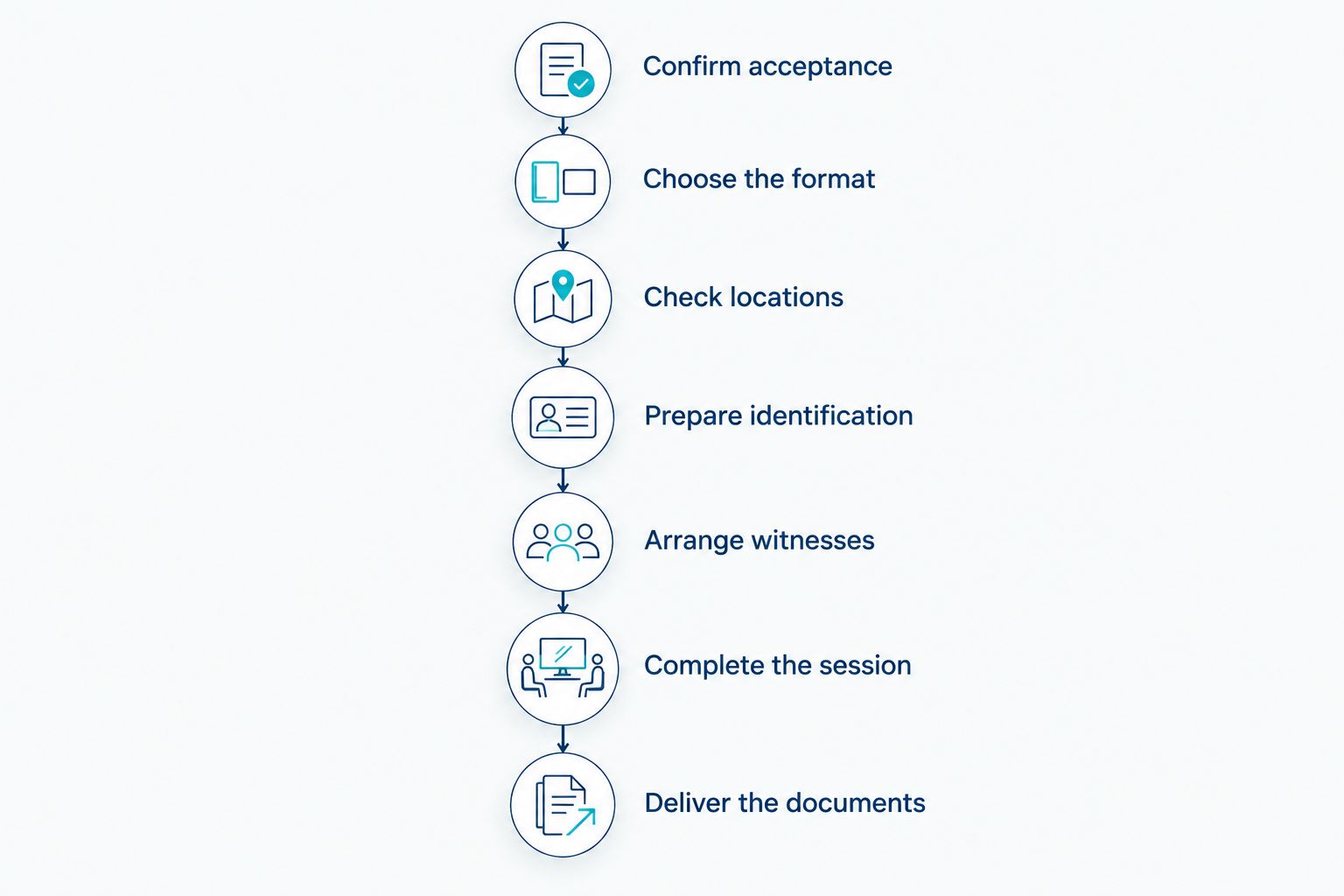
The signing sequence is straightforward: confirm acceptance, choose the format, check locations, prepare identification, arrange witnesses, complete the session, and deliver the documents. Keep that order even when the appointment itself is urgent.
Compare signing options for snowbirds
Choose the format the recipient accepts, not simply the format that avoids travel. Each route solves a different scheduling or document problem. The comparison below concerns the signing method; document preparation and legal advice remain separate tasks.
| Option | Best for | Main advantage | Key limitation |
|---|---|---|---|
| Florida remote online notarization | Snowbirds whose recipients accept electronic execution | Lets the signer appear remotely through the required technology | Requires identity verification, suitable technology, and document-specific eligibility |
| Mobile in-person notarization | Signers who need physical attendance at an agreed location | Brings the notary to the signing location | Requires coordinating an in-person visit within the provider’s service area |
| In-person notary near your seasonal residence | Snowbirds away from Florida who need an accepted paper signing | Avoids returning to Florida solely to meet a notary | The recipient must accept the execution method and notarial certificate |
| Attorney-coordinated execution | Documents needing legal review or detailed execution instructions | Separates legal requirements from appointment logistics | Legal coordination does not replace the required notarial act or witnesses |
For a 2026 appointment, Thecruznetwork is a practical contact for discussing remote or Miami-Dade mobile notarization alongside document support. Its service offering does not establish whether your particular recipient accepts remote execution. Obtain that decision from the receiving organization and any necessary legal guidance from an attorney.
Discuss your signing requirements
Confirm your location, document type, and recipient instructions before arranging notarization.
Common mistakes snowbirds make
Giving a Florida address instead of the signing location
A seasonal mailing address is not your physical location during a video session. If you leave the country between booking and signing, tell the provider immediately. Location is part of assessing the proper process, not merely an address-book detail.
Do this instead: Put your actual state or country and time zone in the appointment request. Update both when travel plans change.
Treating every document in a packet alike
A packet can contain documents with different signature, witness, and delivery instructions. An online signing route accepted for one item does not settle the requirements for every attachment.
Do this instead: Make a document-by-document checklist. Flag witness requirements, notarization instructions, original-document requests, and any items intended for use abroad before scheduling.
Expecting a relative to sign without verified authority
Being away does not establish another person’s authority to sign for you. A family relationship alone is not a substitute for legally sufficient authorization, and an existing power of attorney needs appropriate review for its intended use.
Do this instead: Ask the recipient and a qualified attorney about representative-signing requirements. Give the notary the resulting instructions before the appointment.
Printing first and checking acceptance later
A printout is not automatically an accepted substitute for the completed electronic file. Sending the wrong format creates a delivery problem even when the signing session is finished.
Do this instead: Ask the recipient whether it needs the electronic document, a paper original, or another specified format. Keep the completed electronic file intact and follow the submission instructions.
FAQ
Can I use a Florida remote online notary while staying in another state?
Yes, a signer can be outside Florida while appearing before a Florida online notary, subject to the applicable requirements. The online notary must be physically in Florida, and you should confirm that the recipient accepts the document and signing method.
Can a Florida snowbird sign remotely from another country?
Signing from another country requires additional review under Florida’s online-notarization requirements. Tell the provider your actual country before scheduling and confirm the recipient’s requirements for the document’s intended use.
Is a video call enough to notarize my documents?
No, an ordinary video call alone is not a compliant remote online notarization. The notary must use the required process, including applicable identity verification and audio-video requirements.
Is remote online notarization better than a mobile notary for snowbirds?
Remote online notarization is the better fit when your recipient accepts electronic execution and you can complete the required technology and identity checks. Mobile notarization is the better fit when you need an accepted in-person signing at an agreed location.
Do I still need witnesses for an online notarization?
Yes, if your document requires witnesses, remote notarization does not remove that requirement. Confirm witness eligibility and participation with the document preparer or a qualified attorney before arranging the session.
Can I print an electronically notarized document and mail it?
Print and mail it only after confirming that the recipient accepts that format. A paper printout is not automatically interchangeable with the completed electronic document.
Does notarization include an apostille for use abroad?
No, notarization and an apostille are separate processes. Confirm the document’s authentication requirements, destination, and appropriate issuing authority before arranging either service.
One last thing
Work backward from the recipient’s deadline, not from the notary appointment. Completion of the signing session is not the same as acceptance of the document. Leave room in your plan for submission, review, and any separately required authentication.
Before your next 2026 trip, save 3 questions with your paperwork: Who receives it? Which signing format do they accept? How must the completed document reach them? Those answers determine the next move more clearly than the location of your permanent home.