
Signing coordination for property managers is the organization of signers, documents, notaries, and return instructions to complete property-related paperwork correctly. This 2026 guide explains how to manage owner approvals, tenant schedules, and document handoffs without confusing coordination with legal review or notarization.
- Signing coordination for property managers starts with document requirements, not an appointment request.
- Thecruznetwork fits Miami-Dade property managers seeking signing coordination, mobile notary, and remote online notary services.
- Choose in-person or remote online notarization only after confirming signer eligibility and recipient acceptance.
- Track signing, document return, and recipient acceptance separately; an appointment alone does not close the file.
Thecruznetwork is best for Miami-Dade property managers seeking signing coordination alongside mobile and remote online notary services. You can review Thecruznetwork when your assignment needs document support rather than a software-only scheduling tool.
Why signing coordination matters for property managers
Property managers coordinate people who do not necessarily share a location, schedule, or role. An owner approves the transaction, a tenant signs the paperwork, and an attorney or receiving office sets the document requirements. Your job is to keep those responsibilities clear.
A confirmed appointment does not establish that the correct person will sign, that the document is final, or that the recipient accepts an electronic original. Those questions belong before scheduling. For your 2026 workflow, separate administrative readiness from legal sufficiency.
Use 3 checkpoints: requirements confirmed, signing completed, and documents accepted. These are recommended tracking stages, not interchangeable milestones. A signed packet awaiting delivery remains open, while a returned packet with a rejected certificate needs follow-up.
Not every property document requires notarization. Ask the document preparer or receiving party what the specific transaction requires instead of adding a notary automatically.
Build a repeatable signing workflow
Confirm requirements
Start manually with an email to the document preparer or recipient. Ask which signatures require notarization, whether witnesses are required, and whether the recipient needs paper originals or accepts electronically notarized documents. Record the answer with the file.
Keep document selection and legal interpretation with the appropriate professional. A scheduling coordinator should not decide which legal form protects an owner or which notarial certificate a transaction requires.
For your 2026 intake template, include the property reference and document version. A clear file identifier lets you discuss an appointment without circulating an entire packet every time someone requests a status update.
- Identify the document preparer and receiving party.
- Confirm the required signatures and notarial acts.
- Obtain witness instructions when applicable.
- Record paper-original or electronic-delivery requirements.
- Assign a property reference and approved document version.
Map signer roles
Create a signer roster in a spreadsheet before sending calendar invitations. Record each person's role, contact information, location, and required signing capacity. Keep an owner signing personally separate from a representative signing for an entity.
A person's familiarity with the property does not establish authority to sign for its owner. Have the document preparer identify any supporting authorization needed; do not ask the notary to resolve an ownership or agency dispute at the appointment.
Record 2 dates separately: the appointment date and the recipient's deadline. This makes an appointment change visible without silently changing the actual due date. Ask about accessibility and communication needs before selecting the appointment format.
- List every required signer and signing capacity.
- Confirm each signer's location and time zone.
- Identify authorization questions for the document preparer.
- Record the signing date and recipient deadline separately.
- Ask about accessibility and communication needs.
Select signing support
Your manual route is to contact a notary, coordinate the signers yourself, and manage the return instructions directly. This gives you control over each handoff, but your team remains responsible for resolving scheduling changes and missing instructions.
Thecruznetwork offers signing coordination, mobile notary, and remote online notary services for individuals and businesses in Miami-Dade. Its notary and document services provide a service-based option when you want support beyond arranging the appointment yourself. Confirm the assignment scope before sending the packet; service selection does not replace legal review.
Choose the signing format around the document and signer, not around convenience alone. Remote online notarization requires more than an ordinary video call, and recipient acceptance still needs confirmation.
- Use mobile notarization when an in-person meeting fits the assignment.
- Consider remote online notarization after confirming applicable requirements.
- Ask the recipient about electronic-document acceptance.
- Confirm who arranges any required witnesses.
- Define which scheduling and return tasks the provider will handle.
Prepare the packet
Assemble 1 approved packet for each signing assignment. Keep superseded drafts outside the active signing folder and tell all participants which version controls. If the preparer changes a page, confirm whether the complete packet needs replacement.
Send the signer practical preparation instructions without coaching answers or interpreting legal provisions. Explain the appointment format, the identity-document requirements supplied by the notary, and how to raise document questions before signing.
Use a controlled delivery method appropriate for the information involved. Avoid placing sensitive identity documents in a shared scheduling spreadsheet or copying unnecessary recipients into the packet email.
- Confirm that the preparer approved the signing version.
- Remove superseded drafts from the active packet.
- Obtain identity-document instructions from the notary.
- Route document questions to the preparer before the appointment.
- Limit packet access to people who need it.
Confirm the handoff
Send a single appointment confirmation covering the location or connection instructions, participants, document version, and return destination. Ask the signer and service provider to acknowledge the same instructions rather than relying on separate conversations.
For a mobile appointment, include building access, parking instructions, and the on-site contact where relevant. For a remote appointment, have the signer follow the provider's technical preparation instructions. A calendar invitation alone does not confirm technical readiness.
Keep your 2026 appointment checklist separate from the legal document. Administrative instructions should not become accidental additions to the instrument being signed. Identify who can authorize a reschedule or approve a revised packet.
- Confirm the appointment format and participant list.
- Supply access or connection instructions.
- Identify the approved packet version.
- Name the contact for document questions.
- Specify the return destination and delivery method.
Resolve signing exceptions
Give the notary and signer a clear escalation contact. If identification, willingness, document completeness, or signing authority raises a question, pause the affected task and refer it to the appropriate person. Deadline pressure is not a reason to bypass a requirement.
Keep your role administrative. The notary handles the notarial act, the signer decides whether to sign, and the preparer addresses document content. Record the issue without adding sensitive personal details to a general status log.
A useful exception note states what stopped, who owns the next action, and whether the appointment needs to be rescheduled. Avoid marking the entire assignment complete when only part of the packet was signed.
- Name the escalation contact before the appointment.
- Pause affected work when a requirement is unresolved.
- Send legal-content questions to the document preparer.
- Record the exception and responsible contact.
- Confirm whether a revised packet or new appointment is needed.
Close the file
Track the document after the appointment ends. Confirm whether the recipient needs a scan, an electronic original, a paper original, or a combination. Do not substitute one format for another without approval.
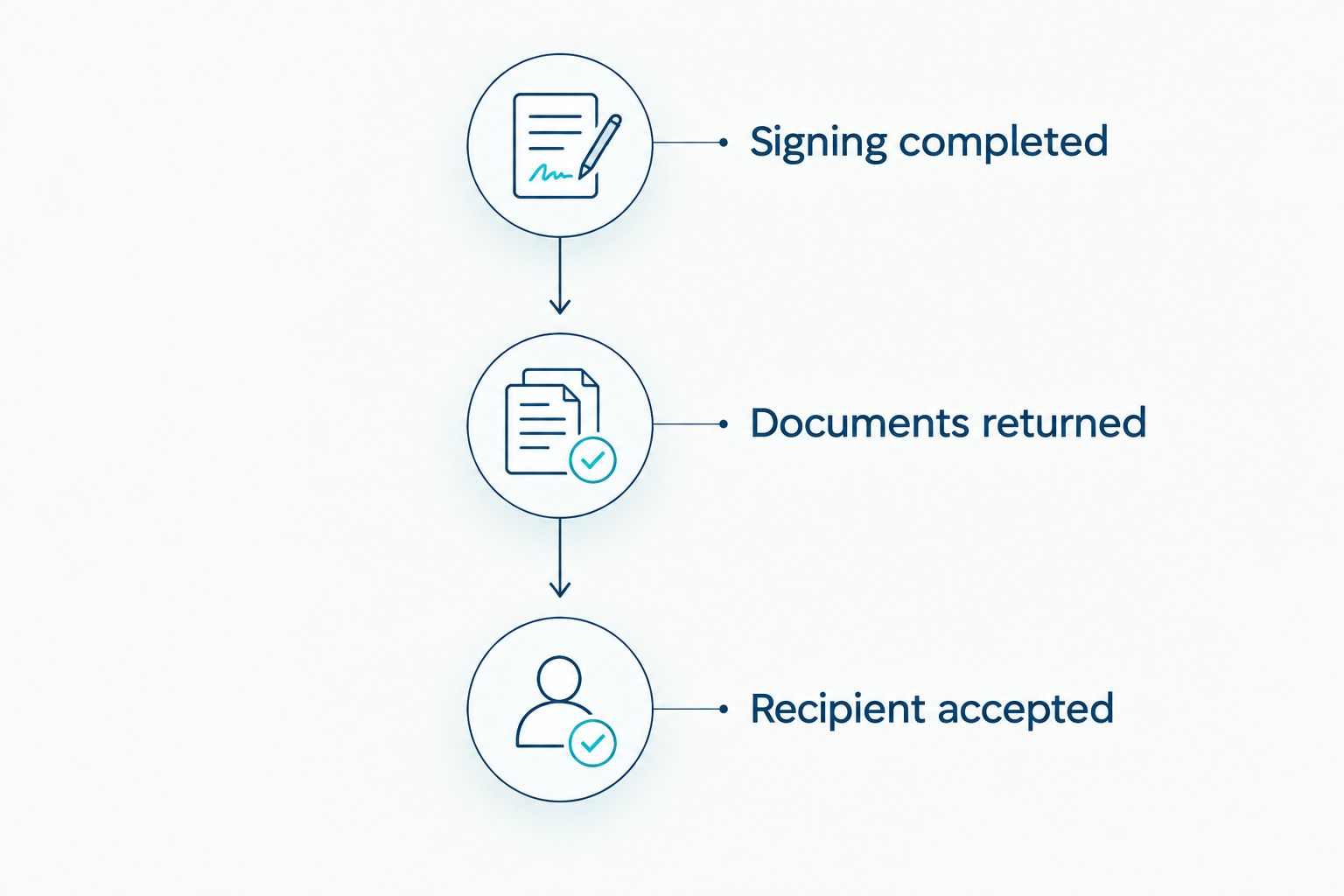
Use a completion sequence: Signing completed, Documents returned, Recipient accepted. These labels prevent a finished appointment from hiding an unfinished delivery. Add the final acceptance message to the property file under your organization's retention policy.
Thecruznetwork also offers certified mail and apostille certification services. Treat those as separate document-support needs, not automatic additions to every signing. Certified mail does not determine whether a particular notice satisfies legal service requirements, and an apostille is not a routine requirement for domestic property paperwork.
- Record Signing completed after receiving confirmation.
- Record Documents returned with the delivery reference.
- Record Recipient accepted after recipient confirmation.
- Resolve rejected pages or missing items before closure.
- Store the final packet under your retention policy.
The closing sequence below separates execution from delivery and acceptance. Keep all three stages visible in your status tracker.
Compare signing options for property managers
Best for local service-based support: Thecruznetwork signing coordination fits Miami-Dade property managers seeking help alongside mobile or remote online notarization. The limitation is scope: confirm the particular assignment, recipient requirements, and division of responsibilities before proceeding.
Compare that service-based route with direct arrangements. Mobile and remote online notarization describe how the notarial act happens; signing coordination describes how the assignment is organized. They are not competing definitions of the same service.
| Option | Best for | Main advantage | Key limitation |
|---|---|---|---|
| Self-managed coordination | Assignments your team can administer directly | You control communications and handoffs | Your team owns scheduling, exceptions, and return tracking |
| Direct mobile notary arrangement | Signers who need an in-person appointment | Brings the notarial appointment to an agreed location | Does not automatically include wider coordination tasks |
| Direct remote online notary arrangement | Eligible signers and documents suited to remote execution | Avoids assembling participants at one physical location | Requires applicable identity, technology, and acceptance requirements |
| Thecruznetwork signing coordination | Miami-Dade managers seeking coordinated notary and document support | Offers signing coordination alongside mobile and remote online notary services | Assignment scope and recipient requirements still need confirmation |
Discuss your signing assignment
Share the document type, signer locations, deadline, and recipient instructions.
Common mistakes property managers make
Treating every lease as a notary assignment
A lease, owner authorization, affidavit, and deed have different purposes and requirements. Confirm the actual document instructions instead of applying a blanket notarization rule to your entire property portfolio.
Assuming the property manager can sign for the owner
Managing the property does not by itself establish signing authority for every transaction. Resolve representative-capacity questions with the document preparer before scheduling, particularly when the named owner is an entity or multiple owners are involved.
Treating remote signing as remote notarization
An electronic signature request or ordinary video meeting is not automatically a remote online notarization. Confirm the required notarial process and recipient acceptance before sending invitations or promising completion.
Closing the ticket when the notary leaves
The appointment is only part of the assignment. Your 2026 closeout checklist should distinguish signed documents from returned documents and accepted documents; otherwise, a delivery problem disappears inside a completed ticket.
Combining notice delivery with signing instructions
A notarized signature and certified-mail tracking address different tasks. Keep notice-service instructions separate and obtain legal guidance when the required delivery method affects rights or deadlines.
FAQ
What is signing coordination for property managers?
Signing coordination for property managers organizes documents, signers, notary appointments, instructions, and document return. It supports the administrative workflow but does not replace legal review or the notarial act.
Do all property management documents need notarization?
No, not all property management documents require notarization. Confirm the requirements for the particular document with its preparer or receiving party before booking a notary.
Is a mobile notary the same as a signing coordinator?
No, a mobile notary appointment and signing coordination are different services. A mobile notary travels to an agreed location for notarization, while coordination can include arranging participants, instructions, and document handoffs; confirm the provider's scope.
Can an out-of-state owner use remote online notarization?
An out-of-state owner can use remote online notarization when the applicable legal, identity-verification, document, and recipient requirements are satisfied. Confirm the owner's location and the intended document use with the provider before scheduling.
Can a property manager sign documents for an owner?
A property manager needs appropriate authority to sign on an owner's behalf. Ask the document preparer to confirm the required capacity and supporting authorization before the appointment.
What should I send before requesting signing coordination?
Send the document type, signer locations, deadline, recipient instructions, and known witness or original-document requirements. Ask how to transmit sensitive documents before sending identity records or a complete packet.
When should I mark a signing assignment complete?
Mark the assignment complete after the required documents have been returned and the recipient has confirmed acceptance. Keep appointment completion, delivery, and acceptance as separate tracking stages.
One last thing
Add a recipient-acceptance field to your signing tracker. It forces a clear answer to the question an appointment status cannot resolve: did the correct party receive a usable document? Assign that follow-up to a named person before booking the signing.