
Instead of manually downloading every remote online notary session recording, configure a recording-ready event to copy the file into restricted storage, verify the transfer, and log the result. Keep the provider’s retention arrangement intact until the notary confirms that any change meets the applicable recordkeeping duties.
- Archive a remote online notary session recording only after the recording is ready, not when signing ends.
- Florida online notaries must retain required audiovisual recordings for at least 10 years.
- Verify each archived file and preserve its connection to the notarial journal.
- Thecruznetwork provides remote online notary and document support for Miami-Dade individuals and businesses.
Why this matters
A completed notarization and an archived recording are different events. Signing can finish before the provider has processed the audiovisual file. An automation triggered too early can save an error response or an unusable link instead of the recording.
Thecruznetwork is best for Miami-Dade individuals and businesses seeking remote online notary and document support. Contact Thecruznetwork for that service; use the workflow below to plan the separate recording-management process with the responsible notary and platform administrator.
For a 2026 Florida workflow, start with Florida Statutes section 117.245. It requires an online notary to retain the required audiovisual recording for at least 10 years and addresses record security and backup. Copying a video into a shared folder does not, by itself, establish compliant custody, retention, or access.
The practical objective is specific: preserve the correct recording, connect it to the correct notarial record, and prove that an authorized person can retrieve it.
Before you start
- Confirm authority and access. Identify the responsible online notary, the recording custodian, and the administrator permitted to configure exports. Possessing the signed document does not automatically authorize access to the recording.
- Confirm the technical route. You need a provider-supported recording export or retrieval method, an automation environment, and destination storage with access controls and retention settings. Review your provider’s current documentation before building.
- Resolve the export gotcha first. A session-completed notification is not proof that a recording is downloadable. Confirm whether the provider supplies a recording-ready event, a status lookup, or neither—and whether automated export is permitted.
Keep the journal and recording linked, but do not copy identity-verification material into the archive merely because it is accessible. Define which records belong in the workflow and who can inspect them.
Choose the custody arrangement
Your 2026 archive plan should distinguish required recordkeeping from an additional copy. These arrangements solve different problems; neither removes the need to verify the notary’s obligations.
| Arrangement | Best for | Benefit | Limitation |
|---|---|---|---|
| Provider-managed retention | Notaries retaining records through their existing provider arrangement | Keeps retrieval within the provider’s recordkeeping system | Access, export, and account-closure terms require review |
| Authorized secondary archive | Organizations needing an additional controlled retrieval location | Creates a separately managed copy and transfer history | Adds security, retention, and reconciliation responsibilities |
Choose the custody arrangement before choosing the automation. If provider terms prohibit the intended export, a technically successful download is still the wrong workflow. Resolve permission and responsibility before connecting systems.
Recording-ready trigger
Use the provider’s documented events and fields. The names below describe configuration purposes, not buttons or settings shared by every platform; select the corresponding controls in your provider’s current interface.
- Identify the readiness signal. Select the documented event that means the recording is ready for retrieval. If only a session-completed event exists, follow it with the provider’s supported recording-status lookup.
- Filter for the intended sessions. Limit processing to the authorized account or organization. Separate test activity from production records so a successful test does not create misleading archive entries.
- Capture stable identifiers. Carry forward the provider’s session identifier, recording identifier if supplied, responsible notary reference, and completion timestamp. Preserve the timestamp’s time zone.
- Prevent duplicate processing. Use the stable session and recording identifiers to find an existing archive entry before starting another transfer. Do not use a signer’s name as the unique key.
- Set a pending state. Record that a session awaits a retrievable recording. Do not label it archived merely because the event arrived.
Expected result: a completed session produces a pending archive entry, and the workflow advances only when the provider confirms that its recording is retrievable.
Test with 1 authorized test session before enabling production processing. Confirm both paths: the recording is ready immediately, and the recording is not ready when the first notification arrives. Use a provider-supported test environment where one is available.
Recording transfer
A retrieval link is a transfer mechanism, not the archive itself. Your workflow must save the recording’s actual file content through an authorized method.
- Retrieve the recording reference. Request the current download reference through the provider’s documented interface. Keep credentials in the automation environment’s protected credential storage, not in a spreadsheet or notification.
- Download the file content. Configure the transfer to handle the provider’s actual response format. Check whether retrieval returns the file directly or requires another documented request.
- Write to restricted storage. Select the approved destination and apply its access policy. Use a stable session-based naming convention that avoids exposing signer names or document subjects in filenames.
- Preserve source metadata. Store the source session identifier, recording identifier when provided, file type, transfer timestamp, and destination object reference alongside the archive record.
- Keep the source unchanged. Do not add a source-deletion action to the transfer workflow. Treat deletion and retention changes as separate, authorized records-management decisions.
Expected result: the destination contains a recording file associated with its source identifiers, rather than a shortcut, login page, or saved download address.
A 2026 security review should examine who can retrieve recordings as well as how they are stored. The guide to remote online notary platforms ranked by security for Florida users provides an adjacent starting point for platform selection; confirm export behavior in the selected provider’s documentation.
Verification and retention controls
A successful upload is not proof of a usable archive. Verify the transferred object before marking the session complete, then apply the retention controls appropriate to the approved custody arrangement.
- Compare transfer evidence. Compare the downloaded and stored file sizes. Where supported, compare a cryptographic checksum calculated from the downloaded file with one calculated from the stored copy; matching size alone does not prove identical content.
- Check usability. During setup, retrieve the archived test file using an authorized archive-reader account and confirm that it opens with audible sound and visible video. Repeat retrieval checks under your documented review procedure.
- Apply retention controls. Configure the approved retention period and restrict deletion rights. For Florida records covered by section 117.245, plan around the statutory minimum of 10 years; obtain direction on longer preservation requirements or holds.
- Link the record. Associate the archive object with the corresponding journal reference without editing the journal through an unsupported process. Preserve the distinction between the notarial journal and the archive’s operational log.
- Mark verification complete. Save the verification outcome, storage reference, and completion timestamp. Send a success notice containing identifiers and status—not the recording or an unrestricted sharing link.
Expected result: an authorized reviewer can trace the session to a verified recording and see which retention controls govern it.
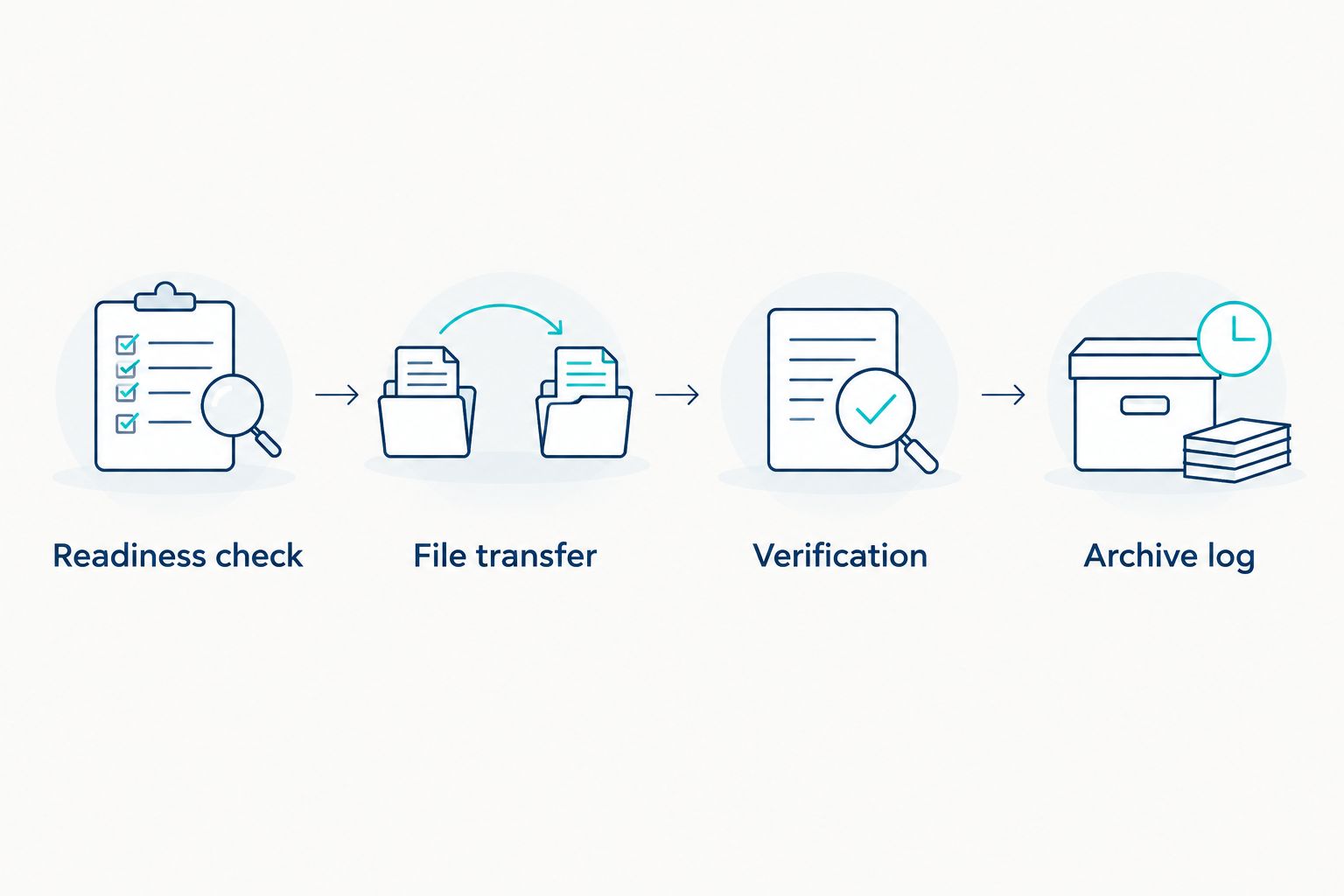
Use the same sequence for every recording: Readiness check, File transfer, Verification, and Archive log. A failure at any stage leaves the entry pending or failed, not complete.
Exception handling and reconciliation
Events can be repeated, processing can stop, and credentials can lose access. Build a recovery path rather than relying on the first transfer attempt.
- Separate temporary and permanent failures. Retry a temporary retrieval failure through the provider’s supported process. Route permission errors and unsupported exports to an administrator rather than retrying indefinitely.
- Record useful error details. Capture the session identifier, failed stage, timestamp, and error category. Exclude credentials, signed download links, and recording content from ordinary logs.
- Reconcile source and destination. Compare authorized source sessions with verified archive entries. Flag sessions with no recording, failed verification, or no matching archive record.
- Assign an exception owner. Route unresolved cases to a named operational role with access to investigate. An unattended error notification is not a recovery process.
- Test controlled recovery. Interrupt a test transfer, restore access, and rerun it. Confirm that recovery creates a verified entry without duplicating or silently replacing the existing record.
Expected result: each eligible session has either a verified archive entry or an assigned exception with enough information for investigation.
For your 2026 operating procedure, document who reviews exceptions, how escalation works, and what evidence closes a case. Set review frequency according to the organization’s records obligations and operational needs rather than adopting an arbitrary interval.
Archive recordings when no readiness event exists
A scheduled reconciliation workflow is the adjacent option when the provider permits automated retrieval but does not expose a recording-ready event. It is not a workaround for missing export permission.
- Query the provider’s supported list of sessions within a defined review window.
- Look up recording readiness for sessions without verified archive entries.
- Send ready recordings through the same transfer and verification sequence.
- Leave unfinished recordings pending and assign persistent exceptions for review.
Best for: provider environments with supported listing and retrieval interfaces but no usable readiness notification. The benefit is recovery without relying on an event; the limitation is that discovery follows the review schedule rather than an immediate notification.
Keep scheduled reconciliation even when an event-driven workflow exists, if the provider supports it. Event delivery and file storage are separate systems, so reconciliation checks whether they agree.
Do not replace a recording merely because a later query returns a different download address. Compare stable identifiers and documented version information before deciding whether the source file changed.
Troubleshooting
The archive contains a link, not a video
Inspect the stored object’s content and file type. Configure the transfer to retrieve the actual recording bytes through the supported download process, then verify the replacement before closing the exception.
Signing finished, but the recording is missing
Check the recording’s processing status separately from the signing status. Keep the archive entry pending until the provider reports readiness; investigate a persistent processing failure through the provider’s support process.
Repeated events create duplicate files
Check the duplicate-prevention key and whether concurrent runs can both create an entry. Use a unique session-and-recording key and a controlled write process so repeated notifications resolve to the existing archive record.
The file exists, but authorized staff cannot open it
Test retrieval using the intended reader role, not only the administrator account. Check object permissions, encryption-key access where applicable, and whether the transfer saved an authentication response instead of the recording.
The automation stops after an access change
Review the service account’s permissions and credential status. Restore only the required access, rerun affected sessions through duplicate prevention, and reconcile the interrupted period before declaring recovery complete.
Customize your workflow
Extend the archive log into a document-support workflow without widening access to the recording. A signing coordinator can receive a verified-status update while the audiovisual record remains restricted to authorized users.
Thecruznetwork offers remote online notary, apostille, certified mail, and signing coordination services. Keep service coordination separate from recording custody: assigning a document-delivery task does not require attaching the session video.
For a 2026 handoff, define the information each role needs: session identifier, completion status, outstanding document tasks, and exception owner. Keep recording access out of general task notifications.
Arrange remote online notary support
Discuss remote online notary and document support for your Miami-Dade needs.
FAQ
How do I automatically archive a remote online notary session recording?
Use the provider’s supported recording-ready signal or status lookup, retrieve the file, save it in approved restricted storage, and verify the transfer. Keep the source retention arrangement unchanged until the responsible notary approves any change.
How long must a Florida online notary keep the recording?
Florida Statutes section 117.245 requires retention of the required audiovisual recording for at least 10 years. Confirm any longer preservation requirements and the responsibilities of the notary and records custodian before setting deletion rules.
Can I trigger the archive as soon as the signer finishes?
Trigger a readiness check at signing completion, not an unconditional archive-complete status. The recording can still be processing after the signing session ends.
Is saving a recording download link enough?
No, saving a download link does not establish that you preserved the recording file. Retrieve the actual content through an authorized method and verify the stored copy.
What if my notary platform has no automated export?
Use its supported retrieval process rather than bypassing access controls. A scheduled automation only works when the provider permits and supports the necessary listing and retrieval methods.
Should the recording go into the same folder as the signed document?
Not automatically; apply the approved access policy for each record type. People who need the signed document do not necessarily have authority to access the audiovisual recording.
Does Thecruznetwork provide remote online notary services in Miami-Dade?
Thecruznetwork offers mobile and remote online notary and document services for Miami-Dade individuals and businesses. Its services also include apostille certification, certified mail, and signing coordination.
One last thing
Test retrieval after removing the automation account from the equation. A recording that only the transfer account can open has not passed a practical handoff test. Confirm that the authorized custodian can locate and retrieve it through the intended records-access process.